GO Launcher EX v2.81 Final Apk
GO Launcher EX v2.81 Final Apk Size : 4.3 MB Requires Android:2.0 and up Android Market Link - Visit Developer - Visit | |
v2.81 change log:
1. (New) Try the clean rubbish data option to avoid duplicated icons (in advanced settings)
2. (Improve) No hidden icons will show up in recent tab
3. (Improve) The response speed of creating app drawer folder
4. (Fix) Duplicated icons error of app drawer folder
5. (Fix) Home screen rendering problem when using themes
Extended version of GO Launcher, one of the most popular home application.
GO Launcher is a highly customizable home repalcement application, one of the most popular home apps in Android Market, which will run when you press your android phone’s HOME key.
GO Launcher EX supports hundreds of themes, fast flip speed and tons of useful functions.
Features:
- Hundreds of themes
- Fancy home screen transition
- Smooth scrolling experience
- Icon popup menu
- Folder and task manager in app drawer
- Gesture supported
- Scrollable & resizable widgets supported
Fixed:
- Add shortcut of GO Launcher (Long press home screen-Shortcut- GO Launcher).
- Synchronize home folder and app draw folder.
- Directly drag to change app icon on dock bar.
- Directly open folder on dock bar.
- Add 3D transition for vertical continuous scrolling (MENU-Preferences-Effects Settings-Vertical scroll effect).
- Support single screen wallpaper (MENU-Preferences-Screen Settings-Normal/Portrait Wallpaper).
Tips:
1. Pinch fingers to enter preview screen and edit home screen pages
2. Search “go launcher theme” to get themes and select them in “Themes preferences”
3. Set screen transition and flip speed in “Display settings”
4. Long press icons on home screen to active popup menu
5. Long press icons in app drawer to edit location, uninstall apps and create folders
6. If you can't set GO Launcher as your default home, download "Home manager"
Important:
1. This is a totally free application and we need directly call phone numbers permission to enable the direct dial shortcut on home screen.
2. We will bring out some charged apps like themes and widgets, but most of our apps are free!
3. The weather and clock widget in screenshots belongs to GO Weather, one of the applications developed by our team!
4. The other widgets in screenshots are our GOwidgets, try to search and download them in Android Market!
5. Download our “Classic Theme GO Launcher EX” to get the wallpaper!
6. GO Dev team has released GO Launcher EX, GO SMS, GO Weather and GO Contacts. More and more applications are coming soon!
Think of an extreme makeover to your phone? Try this out!
Download
Labels: Android 2.0 and up, Android Apps, Android Launcher
ssLauncher v1.2.12 Apk
 | ssLauncher v1.2.12 Apk Size : 488 KB Requires Android:2.2 and up Android Market Link - Visit Developer - Visit |
v1.2.12 change log:
- Fixed bugs in bookmark page on ICS.
- Less home delay on devices with low memory.
- Fixed 'Flipping' animation error on some devices.
- Fixed bugs in 'Other' type of shorcuts.
- Supports Arabic.
- Fixed some bugs and optimized.
Change your screen like a magazine cover page with ssLauncher!
This application is a launcher supporting a variety of styles for shortcuts so that you can create a great mobile screen like a magazine cover page. For more wonderful screen, you can add some fancy font files(.ttf) and apply it to shortcut texts. Save your nice work to a file and share it with your friends!
* Features
- Decorate screen with a variety of styles for shortcuts and widgets.
- Easy and quick access to pages for contacts, bookmarks, application drawer, application group.
- Many useful features of application drawer: showing/hiding app, marking star for favorites apps, changing application icons, uninstalling app and so on
- Create application group and manage list by drag and drop.
- Save and load your theme, page layouts and settings.


Download
Labels: Android 2.2 and up, Android Apps, Android Launcher
Nova Launcher 1.0.1 Final Apk
 | Nova Launcher 1.0.1 Final Apk Size : 1.5 MB Requires Android:4.0 and up Android Market Link - Visit Developer - Visit |
v1.0.1 change log:
- Fix Prime not being detected in some cases
- Fix Hide Apps and Gesture Setting FC
- Fix dock swipes on folders
- Fix Folder background preference not always updating
- Hardware menu button now works in changelog
- Updated translations
This is a normal launcher replacement, it can install alongside the stock launcher and should work on any ICS rom. However in order for the widgets-in-drawer feature to work it must be installed as a system app. Instructions below.
Features include:
- Custom grid size (default 5×4 on the Galaxy Nexus)
- Scrollable Dock
- User setting for auto-rotate
- Resize any widget
- All/New/Downloaded categories in App Drawer
- Widgets-in-drawer (requires install as a system app) or from system picker
- Shortcut or resizable information in Widget Drawer
- Edit App Shortcut and Folder icons and labels (Supports ADW Icon Packs)
- Wallpaper scrolling options (Disabling scrolling improves performance of live wallpapers)
- Cube desktop effect
- Infinite scroll of desktop and dock
- Various other smaller tweaks/optimizations


Download
Labels: Android 4.0 and Up, Android Apps, Android Launcher
GO Launcher EX v2.80 Final Apk
GO Launcher EX v2.80 Final Apk Size : 4.3 MB Requires Android:2.0 and up Android Market Link - Visit Developer - Visit | |
v2.80 change log:
1. (New) Support holistic theme which can change themes of launcher, widget and locker (Use GO Store to download)
2. (New) Homescreen folder supports to custom icon position
3. (New) Gesture settings add a new option for screen lock (If you use the feature, make sure clean the permission before uninstallation.)
4. (Improve) Rearrange the option list of gesture settings
5. (Fix) Error of folder background when overlapping icons
6. (Fix) Wrong default grid size of Galaxy Nexus
Extended version of GO Launcher, one of the most popular home application.
GO Launcher is a highly customizable home repalcement application, one of the most popular home apps in Android Market, which will run when you press your android phone’s HOME key.
GO Launcher EX supports hundreds of themes, fast flip speed and tons of useful functions.
Features:
- Hundreds of themes
- Fancy home screen transition
- Smooth scrolling experience
- Icon popup menu
- Folder and task manager in app drawer
- Gesture supported
- Scrollable & resizable widgets supported
Fixed:
- Add shortcut of GO Launcher (Long press home screen-Shortcut- GO Launcher).
- Synchronize home folder and app draw folder.
- Directly drag to change app icon on dock bar.
- Directly open folder on dock bar.
- Add 3D transition for vertical continuous scrolling (MENU-Preferences-Effects Settings-Vertical scroll effect).
- Support single screen wallpaper (MENU-Preferences-Screen Settings-Normal/Portrait Wallpaper).
Tips:
1. Pinch fingers to enter preview screen and edit home screen pages
2. Search “go launcher theme” to get themes and select them in “Themes preferences”
3. Set screen transition and flip speed in “Display settings”
4. Long press icons on home screen to active popup menu
5. Long press icons in app drawer to edit location, uninstall apps and create folders
6. If you can't set GO Launcher as your default home, download "Home manager"
Important:
1. This is a totally free application and we need directly call phone numbers permission to enable the direct dial shortcut on home screen.
2. We will bring out some charged apps like themes and widgets, but most of our apps are free!
3. The weather and clock widget in screenshots belongs to GO Weather, one of the applications developed by our team!
4. The other widgets in screenshots are our GOwidgets, try to search and download them in Android Market!
5. Download our “Classic Theme GO Launcher EX” to get the wallpaper!
6. GO Dev team has released GO Launcher EX, GO SMS, GO Weather and GO Contacts. More and more applications are coming soon!
Think of an extreme makeover to your phone? Try this out!
Download
Labels: Android 2.0 and up, Android Apps, Android Launcher
ssLauncher v1.2.11 Apk
 | ssLauncher v1.2.11 Apk Size : 488 KB Requires Android:2.2 and up Android Market Link - Visit Developer - Visit |
v1.2.11 change log:
- fixed the error of disappearing all layout on cover page when changing the label.
- fixed the error of running item in previous page when click as soon as page transition finished.
- fixed security exceptions for built-in shortcuts on few devices.
- fixed some bugs and optimized.
Change your screen like a magazine cover page with ssLauncher!
This application is a launcher supporting a variety of styles for shortcuts so that you can create a great mobile screen like a magazine cover page. For more wonderful screen, you can add some fancy font files(.ttf) and apply it to shortcut texts. Save your nice work to a file and share it with your friends!
* Features
- Decorate screen with a variety of styles for shortcuts and widgets.
- Easy and quick access to pages for contacts, bookmarks, application drawer, application group.
- Many useful features of application drawer: showing/hiding app, marking star for favorites apps, changing application icons, uninstalling app and so on
- Create application group and manage list by drag and drop.
- Save and load your theme, page layouts and settings.
Download
Labels: Android 2.2 and up, Android Apps, Android Launcher
ssLauncher v1.2.10 Apk
| ssLauncher v1.2.10 Apk Size : 488 KB Requires Android:2.2 and up Android Market Link - Visit Developer - Visit |
v1.2.10 change log:
- supports Polish
- fixed some bugs and optimized.
Change your screen like a magazine cover page with ssLauncher!
This application is a launcher supporting a variety of styles for shortcuts so that you can create a great mobile screen like a magazine cover page. For more wonderful screen, you can add some fancy font files(.ttf) and apply it to shortcut texts. Save your nice work to a file and share it with your friends!
* Features
- Decorate screen with a variety of styles for shortcuts and widgets.
- Easy and quick access to pages for contacts, bookmarks, application drawer, application group.
- Many useful features of application drawer: showing/hiding app, marking star for favorites apps, changing application icons, uninstalling app and so on
- Create application group and manage list by drag and drop.
- Save and load your theme, page layouts and settings.
Download
Labels: Android 2.2 and up, Android Apps, Android Launcher
GO Launcher EX v2.79 Final Apk
GO Launcher EX v2.79 Final Apk Size : 4.3 MB Requires Android:2.0 and up Android Market Link - Visit Developer - Visit | |
v2.79 change log:
1. (New) Random transition option of homescreen and app drawer
2. (Improve) Hidden apps would not display on homescreen folders
3. (Improve) Display effect of app search results
4. (Improve) Default home setting problem
Extended version of GO Launcher, one of the most popular home application.
GO Launcher is a highly customizable home repalcement application, one of the most popular home apps in Android Market, which will run when you press your android phone’s HOME key.
GO Launcher EX supports hundreds of themes, fast flip speed and tons of useful functions.
Features:
- Hundreds of themes
- Fancy home screen transition
- Smooth scrolling experience
- Icon popup menu
- Folder and task manager in app drawer
- Gesture supported
- Scrollable & resizable widgets supported
Fixed:
- Add shortcut of GO Launcher (Long press home screen-Shortcut- GO Launcher).
- Synchronize home folder and app draw folder.
- Directly drag to change app icon on dock bar.
- Directly open folder on dock bar.
- Add 3D transition for vertical continuous scrolling (MENU-Preferences-Effects Settings-Vertical scroll effect).
- Support single screen wallpaper (MENU-Preferences-Screen Settings-Normal/Portrait Wallpaper).
Tips:
1. Pinch fingers to enter preview screen and edit home screen pages
2. Search “go launcher theme” to get themes and select them in “Themes preferences”
3. Set screen transition and flip speed in “Display settings”
4. Long press icons on home screen to active popup menu
5. Long press icons in app drawer to edit location, uninstall apps and create folders
6. If you can't set GO Launcher as your default home, download "Home manager"
Important:
1. This is a totally free application and we need directly call phone numbers permission to enable the direct dial shortcut on home screen.
2. We will bring out some charged apps like themes and widgets, but most of our apps are free!
3. The weather and clock widget in screenshots belongs to GO Weather, one of the applications developed by our team!
4. The other widgets in screenshots are our GOwidgets, try to search and download them in Android Market!
5. Download our “Classic Theme GO Launcher EX” to get the wallpaper!
6. GO Dev team has released GO Launcher EX, GO SMS, GO Weather and GO Contacts. More and more applications are coming soon!
Think of an extreme makeover to your phone? Try this out!
Download
Labels: Android 2.0 and up, Android Apps, Android Launcher
ssLauncher v1.2.9 Apk
| ssLauncher v1.2.9 Apk Size : 488 KB Requires Android:2.2 and up Android Market Link - Visit Developer - Visit |
v1.2.9 change log:
- fixed the errors in creating app group, contact, bookmark pages on froyo.
- supports some apps for shortcut type ‘Other’.
Change your screen like a magazine cover page with ssLauncher!
This application is a launcher supporting a variety of styles for shortcuts so that you can create a great mobile screen like a magazine cover page. For more wonderful screen, you can add some fancy font files(.ttf) and apply it to shortcut texts. Save your nice work to a file and share it with your friends!
* Features
- Decorate screen with a variety of styles for shortcuts and widgets.
- Easy and quick access to pages for contacts, bookmarks, application drawer, application group.
- Many useful features of application drawer: showing/hiding app, marking star for favorites apps, changing application icons, uninstalling app and so on
- Create application group and manage list by drag and drop.
- Save and load your theme, page layouts and settings.
Download
Labels: Android 2.2 and up, Android Apps, Android Launcher
DXHome DXR v3.0.4 Apk
 | DXHome DXR v3.0.4 Apk Size : 2.9 MB Requires Android:2.1 and up Android Market Link - Visit Developer - Visit |
v3.0.4 change log:
1. new: widget for for phone ring, turn off/on ring by one press!
2. new: 3D effect, long press the middle button of the dockbar and try it.
3. new: change sliding effects randomly,surprises you every time!
4. new: theme for lovers’ day!
Could order your app. by name or time now~
Slide your screen endlessly! That's CRAZY!
By the way, don't forget to swipe your screen,something changed, it's COOL!
DXHome, a highly customized home replacement app., is a perfect home company with Android phones. It is created by the Dianxinos Enterpriser team in Innovation Works invested by Dr. Kaifu Lee. Highly customizable with various themes, colorful desktop transitions, easy operating……, just like its name in Chinese, Dianxin is making the home of your Android phone colorful and enjoyable!
What could you get from DXHome?
1)So many themes to enjoy!
Want your phone to change with your mood?! Try themes we designed for you!
DXHome presents its first six themes of totally different styles!
NO.1 Dianxin Default Desktop Theme--- it is peaceful, clear, warm……, all the nice feelings DXHome wants you to feel. Name it by yourself. It’s our gift~^-^~
NO.2 Midsummer Theme--- get fidgety from the hate outside? Pick some cool and fresh air here!
NO.3 Cake Theme--- are you a foody? How about some candy and cakes now~^-^~ Try it and tell us how it’s like? DXHome is “cooking” more and more for you if you like~
NO.4 Batman— a big Batman fan? Here he comes! COOL!
NO.5 Clothing— want your phone to be cute? DXHome makes suit for your icon! Try it on!
NO.6 Tree & Shadow— at the end, come and sit down beside the tree, just enjoy the peaceful nightfall now.
Not enough? Download the one you want from Internet! This the privilege Dianxin provides specially for you! With DXHome, you could always make your phone to be YOUR STYLE! Yeah, phone might be changed overtime, but your style could last forever with DXHome!
2)What is it like when you swipe your desktop screens??
Here DXHome provides you extremely smooth experience and its first series of desktop transitions! Just swipe! You will be surprised!
3)App. Drawer---Long press any icon in App Drawer, add to Home screen or delete it. Yeah, Soooo easy!
4)Screens Editor--- add, delete or remove any icon, create or edit any shortcuts to apps? It’s YOUR choice now!
By the way, don’t forget to add the weather widget designed by sweet Dianxin, both beautiful and useful!! That’s true!
5) Folder---can’t be any easier to create a new folder, just put two icons together. DXHome will create a folder automatically as you want!
There are SOOO many more than what we show you here, explore it! More surprises are waiting for you!
Keep an eye on us cause more and more are coming! DXHome will keep you being surprised!
There are SOOO many more than what we show you here, explore it! More surprises are waiting for you!
Keep an eye on us cause more and more are coming! DXHome will keep you being surprised!


Download
Labels: Android 2.1 and up, Android Apps, Android Launcher
Nemus Launcher v1.5.4.1 Apk
Nemus Launcher v1.5.4.1 Apk Size : 1.1 MB Requires Android:2.1 and up Android Market Link - Visit Developer - Visit | |
v1.5.4.1 change log:
- Fix : Crashes reported by users
- New : Arabic localization
- Support : Czech, Japanese, Hungarian, Simplified Chinese localization updated
A Home replacement Application with
- Low memory usage
- Quick response
- Easy App finding/management
- Easy Workspace management
- Easy Folder management
Features:
- 1 to 9 workspaces
- 2 App menu(drawer) styles : 1. vertical 2. horizontal paged view
- Expandable folders
- Workspace and app menu switchers (screen preview)
- Highlight recently used apps
- Scrollable bottom docks / QuickSetting docks
- Scrollable widgets
- App-Hide&Lock / Screen-Lock
Working On:
- Themes
- Backup/Restore/Share settings
- More application menu styles
Note:
- If you can't run or find NemusLauncher after install, try home switcher.
https://market.android.com/details?id=ymst.android.homeswitcherfroyo
- "DIRECTLY CALL PHONE NUMBERS" permission is need to make Direct Dial Shortcut.
Download
Labels: Android 2.1 and up, Android Apps, Android Launcher
GO Launcher EX v2.78 Final Apk
GO Launcher EX v2.78 Final Apk Size : 4.3 MB Requires Android:2.0 and up Android Market Link - Visit Developer - Visit | |
v2.78 change log:
1. (New) Click on search button to enter app search in app drawer (also available by long pressing menu button)
2. (Improve) Operation experience and UI details of app search
3. (Improve) Home screen grids when moving icons and widgets
4. (Fix) Blur error after custom the color of app label
5. (Fix) No content error when enter the GO widget list
Extended version of GO Launcher, one of the most popular home application.
GO Launcher is a highly customizable home repalcement application, one of the most popular home apps in Android Market, which will run when you press your android phone’s HOME key.
GO Launcher EX supports hundreds of themes, fast flip speed and tons of useful functions.
Features:
- Hundreds of themes
- Fancy home screen transition
- Smooth scrolling experience
- Icon popup menu
- Folder and task manager in app drawer
- Gesture supported
- Scrollable & resizable widgets supported
Fixed:
- Add shortcut of GO Launcher (Long press home screen-Shortcut- GO Launcher).
- Synchronize home folder and app draw folder.
- Directly drag to change app icon on dock bar.
- Directly open folder on dock bar.
- Add 3D transition for vertical continuous scrolling (MENU-Preferences-Effects Settings-Vertical scroll effect).
- Support single screen wallpaper (MENU-Preferences-Screen Settings-Normal/Portrait Wallpaper).
Tips:
1. Pinch fingers to enter preview screen and edit home screen pages
2. Search “go launcher theme” to get themes and select them in “Themes preferences”
3. Set screen transition and flip speed in “Display settings”
4. Long press icons on home screen to active popup menu
5. Long press icons in app drawer to edit location, uninstall apps and create folders
6. If you can't set GO Launcher as your default home, download "Home manager"
Important:
1. This is a totally free application and we need directly call phone numbers permission to enable the direct dial shortcut on home screen.
2. We will bring out some charged apps like themes and widgets, but most of our apps are free!
3. The weather and clock widget in screenshots belongs to GO Weather, one of the applications developed by our team!
4. The other widgets in screenshots are our GOwidgets, try to search and download them in Android Market!
5. Download our “Classic Theme GO Launcher EX” to get the wallpaper!
6. GO Dev team has released GO Launcher EX, GO SMS, GO Weather and GO Contacts. More and more applications are coming soon!
Think of an extreme makeover to your phone? Try this out!
Download
Labels: Android 2.0 and up, Android Apps, Android Launcher
Nemus Launcher v1.5.4 Apk
Nemus Launcher v1.5.4 Apk Size : 1.1 MB Requires Android:2.1 and up Android Market Link - Visit Developer - Visit | |
v1.5.4 change log:
New :
- Folder on the DockBar
Improve :
- Folder graphics
Fix :
- Dock icons layout for large screen devices
- Hidden app re-appearing when the app updated
- Theme apply screen layout for QVGA screen
- OptionsMenu duplication after system locale change
Change :
- Lock mode notification icon removed
- AppDrawer sorting
‘PerfomanceSetting > HighQualityImages’ removed for Android 3.0+ devices
Localization updated from users:
- fr, ru, ja, nl, zh_CN, pl, bg, pt_PT, el, es_MX, hu, tr
A Home replacement Application with
- Low memory usage
- Quick response
- Easy App finding/management
- Easy Workspace management
- Easy Folder management
Features:
- 1 to 9 workspaces
- 2 App menu(drawer) styles : 1. vertical 2. horizontal paged view
- Expandable folders
- Workspace and app menu switchers (screen preview)
- Highlight recently used apps
- Scrollable bottom docks / QuickSetting docks
- Scrollable widgets
- App-Hide&Lock / Screen-Lock
Working On:
- Themes
- Backup/Restore/Share settings
- More application menu styles
Note:
- If you can't run or find NemusLauncher after install, try home switcher.
https://market.android.com/details?id=ymst.android.homeswitcherfroyo
- "DIRECTLY CALL PHONE NUMBERS" permission is need to make Direct Dial Shortcut.
Download
Labels: Android 2.1 and up, Android Apps, Android Launcher
ssLauncher v1.2.3 Apk
| ssLauncher v1.2.3 Apk Size : 488 KB Requires Android:2.2 and up Android Market Link - Visit Developer - Visit |
v1.2.3 change log:
- customization for all embedded icons and images.
- supports to convert saved theme file(zip) to theme package(apk). (please email for more information)
- select and apply the installed theme package. (like other launchers)
- hide status bar.
- open status bar by sweeping down gesture.
- rename install app.
- supports search bar properly in contacts for chinese.
- supports vetnamian, italian and russian.
- and more features...
- fixed some bugs and optimized.
Change your screen like a magazine cover page with ssLauncher!
This application is a launcher supporting a variety of styles for shortcuts so that you can create a great mobile screen like a magazine cover page. For more wonderful screen, you can add some fancy font files(.ttf) and apply it to shortcut texts. Save your nice work to a file and share it with your friends!
* Features
- Decorate screen with a variety of styles for shortcuts and widgets.
- Easy and quick access to pages for contacts, bookmarks, application drawer, application group.
- Many useful features of application drawer: showing/hiding app, marking star for favorites apps, changing application icons, uninstalling app and so on
- Create application group and manage list by drag and drop.
- Save and load your theme, page layouts and settings.
Download
Labels: Android 2.2 and up, Android Apps, Android Launcher
GO Launcher EX v2.77 Final Apk
GO Launcher EX v2.77 Final Apk Size : 4.3 MB Requires Android:2.0 and up Android Market Link - Visit Developer - Visit | |
v2.77 change log:
1. (Improve) Add “confirm” and “cancel” buttons to hide-app list of app drawer
2. (Improve) Change the display mechanism of number identifier of GO store icon
3. (Improve) Change the display mechanism of app update info
4. (Fix) Bugs of app drawer in certain circumstances
Extended version of GO Launcher, one of the most popular home application.
GO Launcher is a highly customizable home repalcement application, one of the most popular home apps in Android Market, which will run when you press your android phone’s HOME key.
GO Launcher EX supports hundreds of themes, fast flip speed and tons of useful functions.
Features:
- Hundreds of themes
- Fancy home screen transition
- Smooth scrolling experience
- Icon popup menu
- Folder and task manager in app drawer
- Gesture supported
- Scrollable & resizable widgets supported
Fixed:
- Add shortcut of GO Launcher (Long press home screen-Shortcut- GO Launcher).
- Synchronize home folder and app draw folder.
- Directly drag to change app icon on dock bar.
- Directly open folder on dock bar.
- Add 3D transition for vertical continuous scrolling (MENU-Preferences-Effects Settings-Vertical scroll effect).
- Support single screen wallpaper (MENU-Preferences-Screen Settings-Normal/Portrait Wallpaper).
Tips:
1. Pinch fingers to enter preview screen and edit home screen pages
2. Search “go launcher theme” to get themes and select them in “Themes preferences”
3. Set screen transition and flip speed in “Display settings”
4. Long press icons on home screen to active popup menu
5. Long press icons in app drawer to edit location, uninstall apps and create folders
6. If you can't set GO Launcher as your default home, download "Home manager"
Important:
1. This is a totally free application and we need directly call phone numbers permission to enable the direct dial shortcut on home screen.
2. We will bring out some charged apps like themes and widgets, but most of our apps are free!
3. The weather and clock widget in screenshots belongs to GO Weather, one of the applications developed by our team!
4. The other widgets in screenshots are our GOwidgets, try to search and download them in Android Market!
5. Download our “Classic Theme GO Launcher EX” to get the wallpaper!
6. GO Dev team has released GO Launcher EX, GO SMS, GO Weather and GO Contacts. More and more applications are coming soon!
Think of an extreme makeover to your phone? Try this out!
Download
Labels: Android 2.0 and up, Android Apps, Android Launcher
ssLauncher v1.1.7 Apk
| ssLauncher v1.1.7 Apk Size : 488 KB Requires Android:2.2 and up Android Market Link - Visit Developer - Visit |
v1.1.7 change log:
1. fixed not refreshing widgets after screen orientation changed.
2. go to home page by 'Home' button.
3. 'Search' button enabled.
4. shows default phone number in contact page.
5. fixed some bugs and optimized.
Change your screen like a magazine cover page with ssLauncher!
This application is a launcher supporting a variety of styles for shortcuts so that you can create a great mobile screen like a magazine cover page. For more wonderful screen, you can add some fancy font files(.ttf) and apply it to shortcut texts. Save your nice work to a file and share it with your friends!
* Features
- Decorate screen with a variety of styles for shortcuts and widgets.
- Easy and quick access to pages for contacts, bookmarks, application drawer, application group.
- Many useful features of application drawer: showing/hiding app, marking star for favorites apps, changing application icons, uninstalling app and so on
- Create application group and manage list by drag and drop.
- Save and load your theme, page layouts and settings.
Download
Labels: Android 2.2 and up, Android Apps, Android Launcher
Espier Launcher v0.5.2 Apk
Espier Launcher v0.5.2 Apk Size : 4.2 MB Requires Android:2.1 and up Android Market Link - Visit Developer - Visit | |
v0.5.2 change log:
- Enhancement for spotlight search
- Reduce the number of base maps
- Fix some bugs
- Support Russian
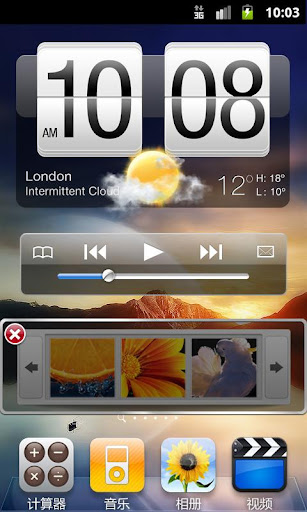
Espier launcher is a mobile phone/tablet desktop software based on Android 2.2 or above version.
It brings you the new Android operating experience. For example, it's easy to operate shortcut icons, folders, and function switches. You can manage multi task and uninstall programs conveniently. Also the natural gestures operation gives you smooth and fluent user experience.
Main Features
- Similar with desktop layout and icons of iPhone 4/iPhone 4S;
- Support dynamic icons, such as calendar, SMS, phone and other icons, dynamically display the date, the number of unread messages or missed calls;
- Create and edit folders by fast way;
- Easy Desktop Editing: press and hold any icon into desktop editing mode;
- Support for adding shortcuts on the desktop;
- Applications Access Control: user must input patterns or digital password to start applications;
- Support a variety of icon sorting method;
- Support for Desktop Searching: you can easily search for applications, contacts, SMS, e-mails and so on;
- Support for Desktop configuration restore/backup;
Main operating methods
- Open desktop editing mode: press and hold any icon until all icons begin to vibrate;
- In desktop editing mode, drag the icon that you wish to move for position adjustment;
- In desktop editing mode, tap "X" on the top left corner the icon for uninstallation;
- In desktop editing mode, drag and overlap any icon help to create a folder;
- In desktop editing mode, press and hold an icon , then filp around the phone will help to move the icon to another switched page;
- Slide finger from screen bottom to top, then go into the task bar, press and hold the icon to vibration and tap "-" on the top left corner of the icon can quickly kill the process;
- Slide the task bar to right into the system function switch area, then you can open or close multiple system functions;
Download
Labels: Android 2.1 and up, Android Apps, Android Launcher
ssLauncher v1.1.5 Apk
| ssLauncher v1.1.5 Apk Size : 488 KB Requires Android:2.2 and up Android Market Link - Visit Developer - Visit |
v1.1.5 change log:
1. Fixed bugs with scrollable widgets.
2. Reduced app launching time when click shortcut.
3. fixed some bugs and optimized.
Change your screen like a magazine cover page with ssLauncher!
This application is a launcher supporting a variety of styles for shortcuts so that you can create a great mobile screen like a magazine cover page. For more wonderful screen, you can add some fancy font files(.ttf) and apply it to shortcut texts. Save your nice work to a file and share it with your friends!
* Features
- Decorate screen with a variety of styles for shortcuts and widgets.
- Easy and quick access to pages for contacts, bookmarks, application drawer, application group.
- Many useful features of application drawer: showing/hiding app, marking star for favorites apps, changing application icons, uninstalling app and so on
- Create application group and manage list by drag and drop.
- Save and load your theme, page layouts and settings.
Download
Labels: Android 2.2 and up, Android Apps, Android Launcher