AdAway v1.28 Apk
AdAway v1.28 Apk Size : 496 KB Requires Android:2.1 and up Android Market Link - Visit Developer - Visit | |
v1.28 change log:
- Now works on devices without cp command
- New debug setting
AdAway is the open source ad blocker for Android using the hosts file.
Attention: DEVICE MUST BE ROOTED FOR THIS APPLICATION
Requirements:
• ROOT
• Read/Write access on system-Partition
Problems:
• On some HTC devices with a 'feature' called S-ON system-Partition is not writable.
More Information can be found in in-app Help screen.
Download
Labels: Android 2.1 and up, Android Apps, For Rooted, Tools
LuckyPatcher v1.0.13 Apk
 | LuckyPatcher v1.0.13 Apk Size : 124 KB Requires Android:1.6 and up | Root Android Market Link - Visit Developer - Visit |
v1.0.13 change log:
1. Added language selection, and that confused many Russian.
2. Completely reworked the algorithm custom patch, now it is much faster … and even earlier if the patch of the neutron people thought that the device is stuck, in fact it is so long, he patches
3. In about adding version information.
4. The templates custom patch appeared identifiers [BEGIN] and [CLASSES], but the algorithm is compatible with older versions without these identifiers. After the [BEGIN] on the next line writes a description of the patch, for what program, etc. [CLASSES] all the templates patch after the next line will be used to patch classes.dex.
5. [LIB] – now works with the first line in the template (previously it was necessary to press Enter several times to withdraw from the beginning)
6. Added new function “Remove Google Ads”, yet in beta version, will operate extremely rare, but may be somebody somehow will help in some way. Applications that can be patched by this function are marked with “~ Google Ads Found! ~”.
7. Removed one extra signature for “Remove License Verification!”.
8. Added patch for Rocking Shortcuts Lite 1.4
9. Fixed the Russian name of the program in English.
10. Formatted slightly differently in the text about.
11. The results of custom patch have become more informative if it fails.
12. Removed from the list of all system applications.
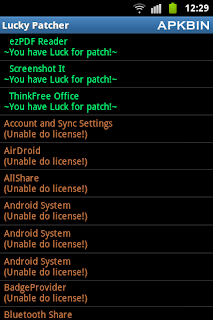
LuckyPatcher is a great tool to bypass Premium Applications License Verification. Now it can Remove some selected application more applications will add soon. To use this patcher you need a rooted device.
Developed by ChelpuS

Download
Labels: Android 1.6 and up, Android Apps, For Rooted, Luckypatcher, Tools
LuckyPatcher v1.0.12 Apk
| LuckyPatcher v1.0.12 Apk Size : 124 KB Requires Android:1.6 and up | Root Android Market Link - Visit Developer - Visit |
v1.0.12 change log:
- Not Available
LuckyPatcher is a great tool to bypass Premium Applications License Verification. Now it can Remove some selected application more applications will add soon. To use this patcher you need a rooted device.
Developed by ChelpuS
Download
Labels: Android 1.6 and up, Android Apps, For Rooted, Luckypatcher, Tools
AdAway v1.27 Apk
AdAway v1.27 Apk Size : 496 KB Requires Android:2.1 and up Android Market Link - Visit Developer - Visit | |
v1.27 change log:
- No longer needs busybox
- Fixed problems with reverting
- Method to restart Android changed
AdAway is the open source ad blocker for Android using the hosts file.
Attention: DEVICE MUST BE ROOTED FOR THIS APPLICATION
Requirements:
• ROOT
• Read/Write access on system-Partition
Problems:
• On some HTC devices with a 'feature' called S-ON system-Partition is not writable.
More Information can be found in in-app Help screen.
Download
Labels: Android 2.1 and up, Android Apps, For Rooted, Tools
LuckyPatcher v1.0.11 Apk
| LuckyPatcher v1.0.11 Apk Size : 124 KB Requires Android:1.6 and up | Root Android Market Link - Visit Developer - Visit |
v1.0.11 change log:
- Not Available
LuckyPatcher is a great tool to bypass Premium Applications License Verification. Now it can Remove some selected application more applications will add soon. To use this patcher you need a rooted device.
Developed by ChelpuS
Download
Labels: Android 1.6 and up, Android Apps, For Rooted, Luckypatcher, Tools
Market Unlocker v3.2.5.1 Apk
 | Market Unlocker v3.2.5.1 Apk Size : 476 KB Requires Android:2.2 and up Android Market Link - Visit Developer - Visit |
v3.2.5.1 change log:
- Fixed no proxy found error on motorola milestone
- Added support page on about dialog
- Added share button on about dialog
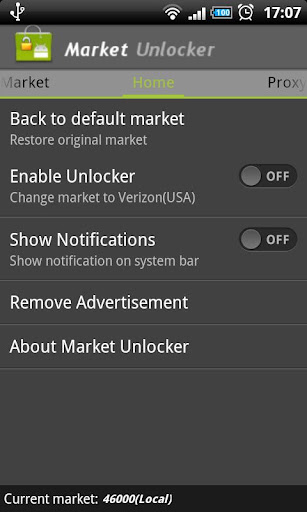
Market Unlocker lets you access paid or restricted apps in Android Market 2.x and 3.x and Amazon Appstore in one click. It's safe, stable, simple and free.
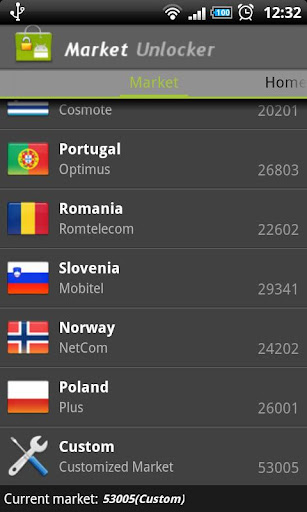
For some apps are just enabled for some specific countries and not available to the other countries,so it is very difficult to download many high quality software. Market Unlocker lets you access paid apps from countries where paid apps are not yet available.
Require:
***Get Root permission
***Have installed Android market
***Have installed Amazon appstore (optional)
Features:
***Change provider in one click
***Change provider automatically on boot or switch to flightmode
***Proxy support for market 3.x. It support HTTP, Socks4, Socks5 proxy and user authentication.
***Support Amazon Appstore outside USA.
It is not permanent, will be original after reboot or flight mode! So if you want to back to default market,just reboot or reset flight mode, but you can check "Auto Unlock" to fake it again automatically.
+++++ IMPORTANT UPDATE +++++
You can keep proxy disabled for your market 2.x, only check "Market Unlocker" to enable the function.
To work with new market 3.x,
1. Configure a USA (surely you can use other countries ip if they also support to show paid/restriced apps) proxy server and fill into market unlocker.
2. Enable proxy
3. Choose provider (optional. by default verizon is selected)
4. Check "Market Unlocker" to enable function.
That's all. Open Android market again, paid apps now are back to you. Good luck!
+++++ New update since version 3.0.8 +++++
Amazon Appstore is supported.
Basically Amazon appstore does not allow users to buy paid apps from outside USA, even if users have been registered use US credit card and US address.
Market Unlocker can also set a USA proxy for Amazon appstore to help you buy daily free apps as well as paid apps.
To achieve this:
First install Appstore app, otherwise the function checkbox will not be visible.
1. Go to Proxy tab
2. Configure Proxy Type, Proxy Host, Proxy Port. Please make sure you're using an effect USA proxy server first.
3. Check "Involve Amazon Appstore" button
4. Enable "Enable Proxy" to "ON"
Then open Appstore again, it should now work for you.
Note: There's no need to enable "Enable Unlocker" for Amazon Appstore.
Download
Labels: Android 2.2 and up, Android Apps, For Rooted, Tools
LuckyPatcher v1.0.10 Apk
| LuckyPatcher v1.0.10 Apk Size : 124 KB Requires Android:1.6 and up | Root Android Market Link - Visit Developer - Visit |
v1.0.10 change log:
- Icon artifacts removed
- Signatures of advertising changed, dual file manager does not have to fall.
- Added menu item to launch applications
- Modified the signature of advertising again, try to applications that previously flew.
- Removed bug removal of non-existent Root rights, and even in version 1.0.3 it worked fine, but the message is deduced.
- In the settings menu now displays just the grind of the text that you selected, and not always great
- Modified the signature cut of advertising, and now the application does not need to throw critical errors, well, or much less frequently.
- Made a restyling display a list of software.
- Now the software is found in which Google is moving higher and is marked in blue.
- And of other minor fixes.
LuckyPatcher is a great tool to bypass Premium Applications License Verification. Now it can Remove some selected application more applications will add soon. To use this patcher you need a rooted device.
Developed by ChelpuS
Download
Labels: Android 1.6 and up, Android Apps, For Rooted, Luckypatcher
AdAway 1.24 Apk
AdAway 1.24 Apk Size : 496 KB Requires Android:2.1 and up Android Market Link - Visit Developer - Visit | |
v1.24 change log:
- Tcpdump DNS request logging
- Preference to allow redirection rules from Hosts Sources
- New hosts source for mobile ads: http://www.ismeh.com/HOSTS
- Webserver binary now updates correctly from old AdAway versions
AdAway is the open source ad blocker for Android using the hosts file.
Attention: DEVICE MUST BE ROOTED FOR THIS APPLICATION
Requirements:
• ROOT
• Read/Write access on system-Partition
Problems:
• On some HTC devices with a 'feature' called S-ON system-Partition is not writable.
More Information can be found in in-app Help screen.
Download
Labels: Android 2.1 and up, Android Apps, For Rooted, Tools
LuckyPatcher v1.0.3 Apk
| LuckyPatcher v1.0.3 Apk Size : 124 KB Requires Android:1.6 and up | Root Android Market Link - Visit Developer - Visit |
v1.0.3 change log:
- Not Available
LuckyPatcher is a great tool to bypass Premium Applications License Verification. Now it can Remove some selected application more applications will add soon. To use this patcher you need a rooted device.
Developed by ChelpuS
Download
Labels: Android 1.6 and up, Android Apps, For Rooted, Luckypatcher, Tools
Market Unlocker v3.2.5 Apk
| Market Unlocker v3.2.5 Apk Size : 476 KB Requires Android:2.2 and up Android Market Link - Visit Developer - Visit |
v3.2.5 change log:
- Enhanced market detecting to reduce annonying notifications
- Removed background phone state service
- Improved configuring market process
- Improved to show active GSM operator instead of configured one
Market Unlocker lets you access paid or restricted apps in Android Market 2.x and 3.x and Amazon Appstore in one click. It's safe, stable, simple and free.
For some apps are just enabled for some specific countries and not available to the other countries,so it is very difficult to download many high quality software. Market Unlocker lets you access paid apps from countries where paid apps are not yet available.
Require:
***Get Root permission
***Have installed Android market
***Have installed Amazon appstore (optional)
Features:
***Change provider in one click
***Change provider automatically on boot or switch to flightmode
***Proxy support for market 3.x. It support HTTP, Socks4, Socks5 proxy and user authentication.
***Support Amazon Appstore outside USA.
It is not permanent, will be original after reboot or flight mode! So if you want to back to default market,just reboot or reset flight mode, but you can check "Auto Unlock" to fake it again automatically.
+++++ IMPORTANT UPDATE +++++
You can keep proxy disabled for your market 2.x, only check "Market Unlocker" to enable the function.
To work with new market 3.x,
1. Configure a USA (surely you can use other countries ip if they also support to show paid/restriced apps) proxy server and fill into market unlocker.
2. Enable proxy
3. Choose provider (optional. by default verizon is selected)
4. Check "Market Unlocker" to enable function.
That's all. Open Android market again, paid apps now are back to you. Good luck!
+++++ New update since version 3.0.8 +++++
Amazon Appstore is supported.
Basically Amazon appstore does not allow users to buy paid apps from outside USA, even if users have been registered use US credit card and US address.
Market Unlocker can also set a USA proxy for Amazon appstore to help you buy daily free apps as well as paid apps.
To achieve this:
First install Appstore app, otherwise the function checkbox will not be visible.
1. Go to Proxy tab
2. Configure Proxy Type, Proxy Host, Proxy Port. Please make sure you're using an effect USA proxy server first.
3. Check "Involve Amazon Appstore" button
4. Enable "Enable Proxy" to "ON"
Then open Appstore again, it should now work for you.
Note: There's no need to enable "Enable Unlocker" for Amazon Appstore.
Download
Labels: Android 2.2 and up, Android Apps, For Rooted, Tools
LuckyPatcher v1.0.2 Apk
| LuckyPatcher v1.0.2 Apk Size : 124 KB Requires Android:1.6 and up | Root Android Market Link - Visit Developer - Visit |
v1.0.2 change log:
- Bug Fix
LuckyPatcher is a great tool to bypass Premium Applications License Verification. Now it can Remove some selected application more applications will add soon. To use this patcher you need a rooted device.
Developed by ChelpuS
Download
Labels: Android 1.6 and up, Android Apps, For Rooted, Luckypatcher, Tools
LuckyPatcher v1.0.0 Apk
| LuckyPatcher v1.0.0 Apk Size : 124 KB Requires Android:1.6 and up | Root Android Market Link - Visit Developer - Visit |
v1.0.0 change log:
1. Added support for TitaniumBackup, GoldenDict and another program with a Custom Patches.
Custom Patches - Patches for this specific program written by me or by anyone in the file format txt. (These files should be put in
the directory / sdcard / LuckyPatcher / - it is automatically created Lucky patcher and already has a few patches).
2. Program, which is custom patch in the folder / sdcard / LuckyPatcher / move to the top of the list and are marked in yellow.
3. In order to apply a custom patch to the program, you need long tapnut on it and select the menu "Custom patch apply!"
4. If the patch is run for all the inscriptions will be green, but in the end it will give greetings and perhaps instructions, it will depend on
person has made a custom patch.
5. If you press the "Add for patch on reboot!" on the program contains a custom patch, boot the device will use this custom patch,
rather than the standard rezalka license.
LuckyPatcher is a great tool to bypass Premium Applications License Verification. Now it can Remove some selected application more applications will add soon. To use this patcher you need a rooted device.
Developed by ChelpuS
Download
Labels: Android 1.6 and up, Android Apps, For Rooted, Luckypatcher, Tools
LuckyPatcher v0.9.0 Apk
| LuckyPatcher v0.9.0 Apk Size : 124 KB Requires Android:1.6 and up | Root Android Market Link - Visit Developer - Visit |
v0.9.0 change log:
- Completely reworked About.
- Now there is more information about the program;
- Posted BootList - a list of programs that will re-patch for zagruzhke device to at least flew registration;
- Violet now spot programs that are in BootList;
- To add a program to BootList long press on it and select "Add for patch on reboot";
- To remove a program from BootList should press settings and choose "Boot Patches List", click there on the program you remove it from the list (a great number of programs can make BootList inhibit your device at boot time);
- Added a new directory in the processing / cache / dalvik-cache / ... Now the program will work and the people who moved here dalvik-cache.
LuckyPatcher is a great tool to bypass Premium Applications License Verification. Now it can Remove some selected application more applications will add soon. To use this patcher you need a rooted device.
Developed by ChelpuS
Download
Labels: Android 1.6 and up, Android Apps, For Rooted, Luckypatcher, Tools
Mobile ODIN Pro v1.30 Apk ( Root )

Mobile ODIN Pro v1.30 Apk ( Root ) | 252 KB | Mediafire
Requires Android:2.2 and up
Mobile ODIN is the on-device firmware flasher of choice. Just throw those firmware files on your (internal or external) SD card, start Mobile ODIN and flash away.
v1.30 update:
# Fixed: Theme
# Fixed: Strange characters in file paths
# Added: Additional file accessability checks
# EverRoot: Fixed some situations where it failed
# EverRoot: Storage warnings added
# FlashKernel: Backed up to SD card instead of /system
# Dump: Various partition information added
!!! Your device must be rooted to be able to use Mobile ODIN !!!
If you use the EverRoot option, Mobile ODIN will root the firmware while you flash it. Checking out that new leaked firmware? No reason to lose root!
Currently supported devices:
- Samsung Galaxy S GT-I9000
- Samsung Galaxy S GT-I9000B *NEW v1.20*
- Samsung Galaxy S GT-I9000M *NEW v1.20*
- Samsung Galaxy S GT-I9003 *NEW v1.20*
- Rogers Captivate SGH-I896 *NEW v1.20*
- AT&T Captivate SGH-I897 *NEW v1.20*
- Samsung Galaxy Tab 7" GT-P1000
- Samsung Galaxy S2 GT-I9100
- Samsung Galaxy S2 GT-I9100T *NEW v1.20*
- AT&T Galaxy S2 SGH-I777 *NEW v1.20*
- Sprint Epic 4G Touch SPH-D710 *NEW v1.20*
- Samsung Galaxy Note GT-N7000
More devices to come!
Download Or Download
Download - Market
Labels: Android 2.2 and up, Android Apps, For Rooted, Tools
ROM Manager Premium v4.8.1.3 Apk + Key
ROM Manager Premium v4.8.1.3 Apk + Key | 1.9 MB | Mediafire | FS
Requires Android:1.6 and up
Must have app for any root user. Make backups, flash ROMs, and own your device.
v4.8.1.3 update:
- Fix another a zip install bug on /data/media devices.
ATTENTION: I have started the rollout of ClockworkMod Recovery 5 for some devices. It will have faster tar backups, and will properly preserve the filesystem type at time of backup. If CWR5 fails to flash try flashing again, that usually fixes it (bad flash). If you have any issues with CWR5, feel free to roll back to the previous version, and report the bug to me at koush@clockworkmod.com!
ROM Manager is THE MUST HAVE APP for any Android root user. (Over 3 million downloads and counting!)
* Flash your recovery to the latest and greatest ClockworkMod recovery.
* Manage your ROMs via a handy UI.
* Organize and perform backups and restores from within Android!
* Install ROMs from your SD card.
* Install your favorite ROMs over the air!
Premium Version:
* Premium ROMs
* Receive notifications for when your ROM is updated!
* Automatic backups
* Install from QR Code
* Web Connect
* Support
Why does ROM Manager ask for account permissions?
Web Connect only needs to access your Google account to connect it to your google account. It can't access any private data or passwords.
Download Or Download
Download - Market
Labels: Android 1.6 and up, Android Apps, For Rooted, Tools
LuckyPatcher v0.8.1 Apk
LuckyPatcher v0.8.1 Apk | 128 KB | Mediafire
Requires Android:1.6 and up | Root
LuckyPatcher iz a great tool to bypass Premium Applicationz License Verification. Now it can Remove some selected application more applicationz will add soon. To use thiz patcher you need a rooted devize.
v0.8.1 update:
1. Redesigned search algorithm, as old managed to miss the correct sequence
2. Changed the signature once again.
3. Now support with Android version 1.6
Developed by ChelpuS
Download
Labels: Android 1.6 and up, Android Apps, For Rooted, Luckypatcher, Tools
ROM Manager Premium v4.8.1.2 Apk + Key
ROM Manager Premium v4.8.1.2 Apk + Key | 1.9 MB | Mediafire | Multiupload
Requires Android:1.6 and up
Must have app for any root user. Make backups, flash ROMs, and own your device.
v4.8.1.2 update:
- Increase image download performance.
- Fix links.
ATTENTION: I have started the rollout of ClockworkMod Recovery 5 for some devices. It will have faster tar backups, and will properly preserve the filesystem type at time of backup. If CWR5 fails to flash try flashing again, that usually fixes it (bad flash). If you have any issues with CWR5, feel free to roll back to the previous version, and report the bug to me at koush@clockworkmod.com!
ROM Manager is THE MUST HAVE APP for any Android root user. (Over 3 million downloads and counting!)
* Flash your recovery to the latest and greatest ClockworkMod recovery.
* Manage your ROMs via a handy UI.
* Organize and perform backups and restores from within Android!
* Install ROMs from your SD card.
* Install your favorite ROMs over the air!
Premium Version:
* Premium ROMs
* Receive notifications for when your ROM is updated!
* Automatic backups
* Install from QR Code
* Web Connect
* Support
Why does ROM Manager ask for account permissions?
Web Connect only needs to access your Google account to connect it to your google account. It can't access any private data or passwords.
Download Or Download
Download - Market
Labels: Android 1.6 and up, Android Apps, For Rooted, Tools
Copy Paste It v4.06 Apk
Copy Paste It v4.06 Apk | 1.9 MB | Mediafire | Multiupload
Requires Android:1.5 and up
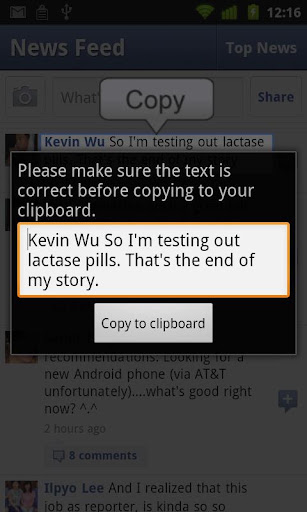
*May require a rooted phone (depends on phone)* Copy text from ANY screen to your clipboard. Then, paste it into any text box by long-pressing on it.
v4.06 update:
- Works on Android 4.0 devices
Use this to have copy paste functionality from ANY app or screen!
- Copy text to clipboard using on-board or networked OCR recognition.
- Copy to clipboard by shaking phone.
- Copy to clppboard by long-pressing on search button.
- Copy to clipboard by pressing overlay button.
- Support for many different languages.
NOTE: If this version does not work because your phone is not rooted
Download Or Download
Download - Market
Labels: Android 1.5 and up, Android Apps, For Rooted, Tools
Titanium Backup PRO v4.7.3 Full Apk + TBPatcher
Titanium Backup PRO v4.7.3 Full Apk + TBPatcher | 1.5 MB | Mediafire | Multiupload
Requires Android:1.0 and up
The ONLY tool that can backup, restore, freeze (with Pro) your apps + data + Market links! Even protected apps! 0-click Batch/scheduled backups! PRO version has 0-click batch restores, Dropbox sync, Dalvik cleaner & MORE!
v4.7.3 update:
• Added the ability to "inverse filter" by labels (ie: exclude labeled apps from the list).
• Added Portuguese language.
• Added Romanian language.
• Major translation updates. Huge thanks to all translation teams!
• Minor tweaks in the "App storage summary" screen
PRO Features:
• Multiple backups per app
• 0-click batch restore
• Encryption
• Batch verification
• Hypershell speed
• Market Doctor
• Apps freezer
• Unlimited schedules
• Sync to/from Dropbox
• Brand the app with your name
• NEW: Bloatware Melter (experimental)
Instructions:
1. install Titanium Backup and don't run.
2. install TBPatcher
3. Press "Press for Activate"
4. Done
Download Or Download
Download - Market
Labels: Android 1.0 and up, Android Apps, For Rooted, Tools
Wifi Protector Full v1.3.0 Apk

Wifi Protector Full v1.3.0 Apk | 1.6 MB | FS
Requires Android:2.1 and up
Detection works on all phones, protection and prevention works ONLY ON ROOTED phones. Detection of and protection against all kinds of ARP (Address Resolution Protocol) related attacks in WiFi Networks, like DOS (Denial Of Service) or MITM (Man In The Middle).
v1.3.0 update:
FEATURE: Wi-Fi can be automatically disabled on attack (optional). This is useful on non-rooted phones
FEATURE: App can be brought to the front on attack (optional)
OTHER: Improved compatibility with battery saving apps
Detection works on all phones, protection and prevention works ONLY ON ROOTED phones.
Easy to use: If the shield is blue you're fine, if the shield is red you may decide for countermeasures (ROOT required).
Download
Download - Market
Labels: Android 2.1 and up, Android Apps, For Rooted, Tools