Showing posts with label WiFi File Share. Show all posts
Showing posts with label WiFi File Share. Show all posts
File Expert v4.1.2 Apk
File Expert v4.1.2 Apk Size : 1.9 MB Requires Android:2.1 and up Android Market Link - Visit Developer - Visit | |
v4.1.2 change log:
1. Root explorer mode finally finished Beta testing and now released as exclusive feature for all donate users only.
We have sent donate plugin to all previous Paypal donate users.
2. Built-in image viewer now supports multi-touch!
3. Add Polish, Portuguese and Turkish language support
4. Fix some bugs related to Bluetooth OBEX, file copying, batch app uninstall and batch app backup
Powerful File Manager/WIFI File Transfer Web & FTP/App Manager - ALL in ONE
Best & Leading Android file manager of all time with enhanced WIFI sharing and management, root explorer and Bluetooth support! More than 6 millions of users worldwide and still fast growing! Join us today!
* All basic file operations - Copy, Paste, Move, Create and Rename your files and folders
* FTP/HTTP Server - Share & Manage your files without a USB cable, just like with Web Sharing or WIFI File Explorer, but we do even more because we can provide both Web & FTP transferring support. Web management featuring a Windows style interface!
* Root access to system folders and files like Root Explorer. Remount those locations to read write. Requires rooted phone to function. This feature is in BETA testing. Use it on your own risk.
* SMB, FTP, SFTP and FTPS Client - Access your host computer from your phone, using your phone to manage your PC via WIFI with SMB, FTP, SFTP or FTPS
* Bluetooth - Sharing your files over Bluetooth OBEX FTP. Send any files via Bluetooth OPP
* NFC Support. You can use NFC-enabled phone to transfer files and apps.
* WiFi Send. Directly send files via WiFi between File Expert powered phones
* App Manager - Uninstall/Backup apps. We know that many apps on the market can do this, but none can do this work silently. We're the ONLY app that can install and uninstall apps silently, which makes your batch process faster and cooler. Silent capabilities require a rooted phone to function.
* Archive manager - Create and decompress ZIP archive, Decompress RAR. You can view your ZIP/RAR/GZIP/TAR/TGZ/BZ file just like accessing a folder and directly decompress unique files and folders
* Thumbnails - supports jpg/png/mp3/mp4/3gp thumbnails
* Text Viewer
* Image Viewer - supports both local and remote folder
* Search SD card, perform operations on search results
* Help your player to play media that stores on SMB share (your player needs to support HTTP streaming). WE are the ONLY file manager that can directly open some types of videos over SMB network
* File Picker - Let FE to help you anywhere you want :)
* Theme support - Choose themes that you love for FREE!
Why choose FE? Here are the reasons:
1. No ADs and it's FREE
2. Gives you almost everything you need to manage your phone's resources
3. Smaller size than competitors like ES and Astro
4. Acceptable performance
5. Free technical support via email
6. Clear User Interface, and most operations can be done only in touch
7. The ONLY file manager that supports both PC 2 phone & phone 2 PC wifi file transfer and can directly play some videos and music via SMB
8. Root access support
9. Themes
We know that Astro is great but you have to buy Pro version in order to remove annoying ADs. We can provide all functions that Astro does and offer you even more useful features like Web sharing support. Why not give us a try?


Download Or Download
Labels: Android 2.1 and up, Android Apps, File Manager, Tools, WiFi File Share
WiFi File Explorer PRO v1.6.0 Apk
WiFi File Explorer PRO v1.6.0 Apk | 1 MB | Mediafire
Requires Android:1.6 and up
Browse, transfer, download, upload, delete, copy, rename, stream and manage files that are on your Android device, using a web browser via a WiFi connection.
v1.6.0 update:
1. Add options to switch WiFi on/off when app starts/ends
2. android.permission.CHANGE_WIFI_STATE has been added to facilitate the new option to switch WiFi on/off when app starts/ends
3. Add option to set the number of thumbnails per page
4. Add option to show mini thumbnail icons for picture, film and application files (slower loading of larger directories though)
5. Add option to show the popup instructions or not
6. Add shortcut Camera mode button to link to the Camera directory
7. ... and more!
* Featured on Life Hacker and recommended by Motorola! The ORIGINAL, best, steadiest, cheapest and most popular WiFi file transfer app with now over half a million users across all app stores worldwide! So don’t waste money by using poor imitation WiFi file transfer apps with similar names ... use the professional, best supported, most feature rich one – WiFi File Explorer *
No more taking your phone apart to get the SD card out or grabbing your cable to access your camera pictures and copy across your favourite MP3s.
"I wholeheartedly recommend going the wireless route with WiFi File Explorer!" - PC World review - 5 stars.
------
FEATURES
1. Using a web browser, you can browse and download all the files on your Android device without the need for a cable. Download entire directories with one click which no other similar app offers;
2. Multiple batch file uploads and downloads to save you time when transferring many files at once from your computer to your Android device or vice-versa;
3. Backup your entire SD card or just backup individual directories with one simple click – for example, backup all your photos just by downloading the Camera directory!
4. Download a streaming media playlist to allow you to quickly flick through and stream all the stored media files in a directory into a media player on your computer. This is a unique feature not offered by other apps;
5. Create brand new directories and delete/rename/copy/zip/unzip files - the perfect file manager;
6. Use the one of a kind gallery viewer to create a slide show of all your camera pictures directly from your Android device. Simply click on a picture’s file name to launch the gallery viewer and then hit the play button to enjoy all your pictures in the web browser;
7. Search box so that you can find any file on your Android device;
8. Select between thumbnail and detail views to choose the best method to quickly browse your files. Thumbnails are supported for both pictures AND videos!
9. It is also uniquely an installer, so automatically install app files with just once click in the web browser;
10. With with one simple click you can set any audio file on your device to become your ringtone;
11. View all the camera pictures and videos or listen to all the music on your Android device streamed directly in a web browser. Use shortcut tabs to quickly view ‘All Music’, ‘All Pictures’ and ‘All Videos’ stored on your device, no matter which directory they are in;
12. Runs as a service in the background so you can use other apps while you are making transfers;
13. Simple to use with no set up or buttons – it just works!
14. Password protected to prevent unwanted access;
15. Ability to configure the port settings;
16. Full support for special characters in file names which competitor apps do not support;
17. Visual indicators and stats of how much free space is on your Android device as well as real-time indicators of how much battery and WiFi signal you currently have;
18. Send an email to the web link from the app for easy connection;
19. Special “Development Goodies” mode to enable SSL protection – email developer for details!
20. LOTS more features in development;
------
* Before emailing, check FAQs at http://dooblou.blogspot.com *
* Follow @dooblou on Twitter for all the latest news and updates as they occur *
* Find us on Facebook – Search for ‘WiFi File Explorer’ *
If you do have problems using this application on your WiFi network, it is most likely a configuration problem with your router/network. Please contact the developer if you have any questions and he may be able to help you ... but please don't rate low because your network isn't configured properly - that isn't the application’s fault ;)
Download
Download - Market
Labels: Android 1.6 and up, Android Apps, Tools, WiFi File Share
AirDroid v1.0.4 Apk
AirDroid v1.0.4 Apk | 2.7 MB | Mediafire / Multiupload
Requires Android:2.1 and up
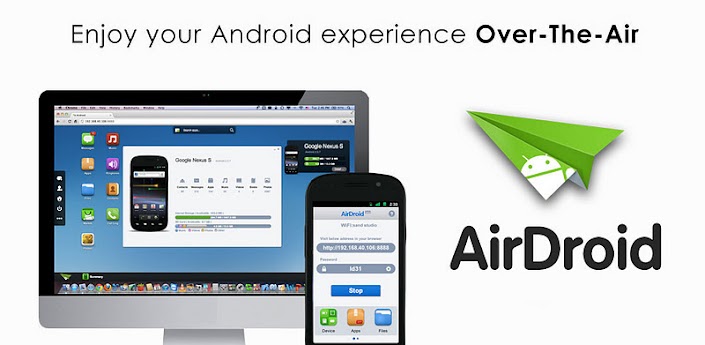
AirDroid is a fast, free app that lets you wirelessly manage & control your Android device from a web browser Over-The-Air.
v1.0.4 update:
- New Features:
- Added Shared Clipboard
- Added Android 4.0(ICS) support (*Experimental)
- Added Call Logs sorting
- Added custom port option
- Added Apps Recommendation
- Added IP notification on login
- Added full screen image preview
- Added page title notification of new messages
- Major Improvement:
- Fixed time display bug in messages
- Improved port auto selection. Fixed bug causing connection error under Chrome.
- Improved messages/contacts loading
- Disable "Keep screen awake" by default
Enjoy below features after installation from the comfort of your favorite web browser on desktop or other devices:
*Files
Transfer files between Android devices and computers.
Cut, copy, paste, search, rename or delete files on the SD card.
*SMS
Read, send, forward or delete SMS messages.
*Applications
Install, uninstall, backup, search apps and do batch processing.
*Photos
Preview, delete, import, export, set as wallpaper and photos slide show from desktop.
*Clipboard
Share clipboard text between desktop and device.
*Contacts
Group, search, create contacts, check and delete call logs.
*Ringtones
Search, preview, import, export, delete and customize ringtones for phone calls, notifications and alarms.
*Music
Play, search, import, export, delete, or set as phone call, notification and alarm ringtones.
AirDroid also comes with the following inbuilt features:
*Device Status
Real-time ROM, SD Card, Battery, CPU and RAM status report & monitor with charts to demonstrate available/used/total resources, and one-tap memory boost.
*Tasks Manager
Kill or uninstall running apps, batch operation supported.
*Apps Manager
Uninstall, share or check details of user and system apps.
*Files
Control Cut, copy, rename, send/share, delete, sort and create visible or hidden folders and files.
What's the requirements to run AirDroid?
AirDroid should be compatible with most Android devices running Android 2.1 or later (4.0 is not well supported yet). The Web Desktop should be compatible with most modern web browsers, including Chrome 12 or later, Firefox 3.6 or later, Safari 5.0 or later (For best performance IE is not recommended).
Download
Labels: Android 2.1 and up, Android Apps, Tools, WiFi File Share
AirDroid v1.0.4 Apk
 | AirDroid v1.0.4 Apk Size : 2.7 MB Requires Android:2.1 and up Android Market Link - Visit Developer - Visit |
v1.0.4 change log:
- New Features:
- Added Shared Clipboard
- Added Android 4.0(ICS) support (*Experimental)
- Added Call Logs sorting
- Added custom port option
- Added Apps Recommendation
- Added IP notification on login
- Added full screen image preview
- Added page title notification of new messages
- Major Improvement:
- Fixed time display bug in messages
- Improved port auto selection. Fixed bug causing connection error under Chrome.
- Improved messages/contacts loading
- Disable "Keep screen awake" by default
AirDroid is a fast, free app that lets you wirelessly manage & control your Android device from a web browser Over-The-Air.
Enjoy below features after installation from the comfort of your favorite web browser on desktop or other devices:
*Files
Transfer files between Android devices and computers.
Cut, copy, paste, search, rename or delete files on the SD card.
*SMS
Read, send, forward or delete SMS messages.
*Applications
Install, uninstall, backup, search apps and do batch processing.
*Photos
Preview, delete, import, export, set as wallpaper and photos slide show from desktop.
*Clipboard
Share clipboard text between desktop and device.
*Contacts
Group, search, create contacts, check and delete call logs.
*Ringtones
Search, preview, import, export, delete and customize ringtones for phone calls, notifications and alarms.
*Music
Play, search, import, export, delete, or set as phone call, notification and alarm ringtones.
AirDroid also comes with the following inbuilt features:
*Device Status
Real-time ROM, SD Card, Battery, CPU and RAM status report & monitor with charts to demonstrate available/used/total resources, and one-tap memory boost.
*Tasks Manager
Kill or uninstall running apps, batch operation supported.
*Apps Manager
Uninstall, share or check details of user and system apps.
*Files
Control Cut, copy, rename, send/share, delete, sort and create visible or hidden folders and files.
What's the requirements to run AirDroid?
AirDroid should be compatible with most Android devices running Android 2.1 or later (4.0 is not well supported yet). The Web Desktop should be compatible with most modern web browsers, including Chrome 12 or later, Firefox 3.6 or later, Safari 5.0 or later (For best performance IE is not recommended).


Download Or Download
Labels: Android 2.1 and up, Android Apps, File Share, Tools, WiFi File Share
Subscribe to:
Posts (Atom)