File Expert v4.1.2 Apk
File Expert v4.1.2 Apk Size : 1.9 MB Requires Android:2.1 and up Android Market Link - Visit Developer - Visit | |
v4.1.2 change log:
1. Root explorer mode finally finished Beta testing and now released as exclusive feature for all donate users only.
We have sent donate plugin to all previous Paypal donate users.
2. Built-in image viewer now supports multi-touch!
3. Add Polish, Portuguese and Turkish language support
4. Fix some bugs related to Bluetooth OBEX, file copying, batch app uninstall and batch app backup
Powerful File Manager/WIFI File Transfer Web & FTP/App Manager - ALL in ONE
Best & Leading Android file manager of all time with enhanced WIFI sharing and management, root explorer and Bluetooth support! More than 6 millions of users worldwide and still fast growing! Join us today!
* All basic file operations - Copy, Paste, Move, Create and Rename your files and folders
* FTP/HTTP Server - Share & Manage your files without a USB cable, just like with Web Sharing or WIFI File Explorer, but we do even more because we can provide both Web & FTP transferring support. Web management featuring a Windows style interface!
* Root access to system folders and files like Root Explorer. Remount those locations to read write. Requires rooted phone to function. This feature is in BETA testing. Use it on your own risk.
* SMB, FTP, SFTP and FTPS Client - Access your host computer from your phone, using your phone to manage your PC via WIFI with SMB, FTP, SFTP or FTPS
* Bluetooth - Sharing your files over Bluetooth OBEX FTP. Send any files via Bluetooth OPP
* NFC Support. You can use NFC-enabled phone to transfer files and apps.
* WiFi Send. Directly send files via WiFi between File Expert powered phones
* App Manager - Uninstall/Backup apps. We know that many apps on the market can do this, but none can do this work silently. We're the ONLY app that can install and uninstall apps silently, which makes your batch process faster and cooler. Silent capabilities require a rooted phone to function.
* Archive manager - Create and decompress ZIP archive, Decompress RAR. You can view your ZIP/RAR/GZIP/TAR/TGZ/BZ file just like accessing a folder and directly decompress unique files and folders
* Thumbnails - supports jpg/png/mp3/mp4/3gp thumbnails
* Text Viewer
* Image Viewer - supports both local and remote folder
* Search SD card, perform operations on search results
* Help your player to play media that stores on SMB share (your player needs to support HTTP streaming). WE are the ONLY file manager that can directly open some types of videos over SMB network
* File Picker - Let FE to help you anywhere you want :)
* Theme support - Choose themes that you love for FREE!
Why choose FE? Here are the reasons:
1. No ADs and it's FREE
2. Gives you almost everything you need to manage your phone's resources
3. Smaller size than competitors like ES and Astro
4. Acceptable performance
5. Free technical support via email
6. Clear User Interface, and most operations can be done only in touch
7. The ONLY file manager that supports both PC 2 phone & phone 2 PC wifi file transfer and can directly play some videos and music via SMB
8. Root access support
9. Themes
We know that Astro is great but you have to buy Pro version in order to remove annoying ADs. We can provide all functions that Astro does and offer you even more useful features like Web sharing support. Why not give us a try?


Download Or Download
Labels: Android 2.1 and up, Android Apps, File Manager, Tools, WiFi File Share
X-plore file manager v2.50 Apk
 | X-plore file manager v2.50 Apk Size : 688 KB Requires Android:2.1 and up Android Market Link - Visit Developer - Visit |
v2.50 change log:
- Startup password
- Fixes in: root FS, search FS, external cards, streaming from network, Picasa
- Usage statistics
X-plore is dual-pane file explorer with tree view and root access.
Highlights:
* Dual-pane tree view
* Root access (on rooted devices), also allowing changes to read-only files
* Shows all internal and external memory locations
* Seamless work with Zip (as if it was normal folder)
* Favorites (folders, Zips) displayable in root
* Basic media info about images, video and audio files
* Built-in viewers for images, video, audio, text
* Hex viewer
* Fast Image viewer with zoom and slide to previous/next images in folder
* Thumbnails for images and video as well as for various file types (depending on associated application)
* Ability to clear default application handlers
* Multi-selection - always available, yet not disturbing
* Search files in folders (also in Zip or in search results)
* View APK files as ZIP
* Configurable buttons and key shortcuts
X-plore allows you to see inside of your Android phone or tablet.
This is a dual-pane explorer, which means that there're two folders shown at same time, and common operation such as copying files are done from one pane to another.
And X-plore shows folder hierarchy in a tree view. This offers clear orientation on where in file system you currently are, and fast switching to other location.
Currently selected folder and files are highlighed, while other folders/files have slighly darker background.
You may explore internals of the device, and if you're power user and have your device rooted, you can make changes to system data - backup files, remove unwanted applications, etc.
If you're standard user, you may choose to hide internal memory from view and be sure not to mess with system.
You can comfortably see contents of your external memories, either be it built-in high capacity memory, external memory card, or possibly USB memory stick attached to your tablet. All these memory types are listed in main level, you don't need to search for their folders on the device.
Where it makes sense, X-plore tries to tell more about the file. This means showing thumbnails for images and video, and displaying basic media information about music files.
Main operations are related to managing files and folders - viewing, copying, moving, deleting, compressing to Zip, extracting, renaming, sharing, and more.
Main interaction is done by touch screen, clicking on folders or files to open files, or long-click to open context menu which contains options which can be done on particular clicked item, or multiple selected items.
Multi-selection allows to do operation on more files at once. Files can be selected by clicking check box. It is also possible to select all files in a folder, or clear selection, by clicking parent folder's check box.
Opening file may mean to use one of built-in viewer for most popular file types: images, audio, video and text.
Or you may configure X-plore to use system application for opening files, in which case system-predefined application that can open particular file is launched.
Archives (currently supported is Zip) are displayed as other folders. You may open them, see contents, and do standard operations that you'd do on files - rename, delete, copy from/to, etc. You don't feel other difference from normal file system, other than operation may be slower for larger Zip files due to need of recompression.
Additional interaction is possible by button bar, which is between two panes, and is fully configurable. You may put buttons of your desired operations here, and change ordering.
Buttons in this bar become enabled or disabled automatically depending on if it is possible to perform given operation.
Another input comes from configurable keyboard shortcuts. Many android devices are mainly controlled by touch screens, and have minimal buttons or keys. Even on such device, you may assign action to volume keys.
And on devices with full hardware keyboard, many operations may be (and are by default) assigned to various keys.


Download
Labels: Android 2.1 and up, Android Apps, File Manager, Tools
File Expert v4.1.1 Apk
File Expert v4.1.1 Apk Size : 1.9 MB Requires Android:2.1 and up Android Market Link - Visit Developer - Visit | |
v4.1.1 change log:
1. Fix all root mode related bugs
2. Optimized Get New Apps loading policy
Powerful File Manager/WIFI File Transfer Web & FTP/App Manager - ALL in ONE
Best & Leading Android file manager of all time with enhanced WIFI sharing and management, root explorer and Bluetooth support! More than 6 millions of users worldwide and still fast growing! Join us today!
* All basic file operations - Copy, Paste, Move, Create and Rename your files and folders
* FTP/HTTP Server - Share & Manage your files without a USB cable, just like with Web Sharing or WIFI File Explorer, but we do even more because we can provide both Web & FTP transferring support. Web management featuring a Windows style interface!
* Root access to system folders and files like Root Explorer. Remount those locations to read write. Requires rooted phone to function. This feature is in BETA testing. Use it on your own risk.
* SMB, FTP, SFTP and FTPS Client - Access your host computer from your phone, using your phone to manage your PC via WIFI with SMB, FTP, SFTP or FTPS
* Bluetooth - Sharing your files over Bluetooth OBEX FTP. Send any files via Bluetooth OPP
* NFC Support. You can use NFC-enabled phone to transfer files and apps.
* WiFi Send. Directly send files via WiFi between File Expert powered phones
* App Manager - Uninstall/Backup apps. We know that many apps on the market can do this, but none can do this work silently. We're the ONLY app that can install and uninstall apps silently, which makes your batch process faster and cooler. Silent capabilities require a rooted phone to function.
* Archive manager - Create and decompress ZIP archive, Decompress RAR. You can view your ZIP/RAR/GZIP/TAR/TGZ/BZ file just like accessing a folder and directly decompress unique files and folders
* Thumbnails - supports jpg/png/mp3/mp4/3gp thumbnails
* Text Viewer
* Image Viewer - supports both local and remote folder
* Search SD card, perform operations on search results
* Help your player to play media that stores on SMB share (your player needs to support HTTP streaming). WE are the ONLY file manager that can directly open some types of videos over SMB network
* File Picker - Let FE to help you anywhere you want :)
* Theme support - Choose themes that you love for FREE!
Why choose FE? Here are the reasons:
1. No ADs and it's FREE
2. Gives you almost everything you need to manage your phone's resources
3. Smaller size than competitors like ES and Astro
4. Acceptable performance
5. Free technical support via email
6. Clear User Interface, and most operations can be done only in touch
7. The ONLY file manager that supports both PC 2 phone & phone 2 PC wifi file transfer and can directly play some videos and music via SMB
8. Root access support
9. Themes
We know that Astro is great but you have to buy Pro version in order to remove annoying ADs. We can provide all functions that Astro does and offer you even more useful features like Web sharing support. Why not give us a try?
Download
Labels: Android 2.1 and up, Android Apps, File Manager, Tools
ES File Explorer v1.6.1.1 Apk
 | ES File Explorer v1.6.1.1 Apk Size : 2.1 MB Requires Android:1.6 and up Android Market Link - Visit Developer - Visit |
v1.6.1.1 change log:
1) Batch Uninstall
2) Disk Usage Graph
3) Uninstall System App
4) Customize Background
5) Change Language
ES File Explorer for Android is a free, featured all-in-one file manager & application manager & task killer & dropbox client & ftp client which explores your phone and your computer. It allows android users anywhere in the world to manage their resources for free, it makes easy to manage, stay connected using your 3G, EDGE or WiFi, and share with friends, upload photos, watch videos.
Latest Features List :
* File Manager -- Operate files(Copy, Paste, Cut/Move, Create, Delete and Rename, Share/Send) in the phone and computers
* Multiselect files
* Application manager -- Manage apps(Install, Uninstall, Backup, Shortcuts, Category)
* Compress and Decompress ZIP files, Unpack RAR files, can create encrypted (AES 256 bit) ZIP files
* View Different file formats, photos, docs, videos anywhere, support third party applications such as Document To Go to open document files
* Thumbnails for APK,images, and with an inbuilt image browser
* Text viewers and editors
* Search files
* Access your Home PC, via WIFI with SMB
* FTP, it's your FTP client, manage the files on the FTP server as the ones on the sd card
* Dropbox,Box.net,Sugarsync, it's an enhanced cloud storage client other than the official version. It can save photos and videos to your net drive and share your photos and docs, easily edit docs in your account.
* Bluetooth file transfer tool. You can copy and paste files between bluetooth ready devices.It supports OBEX FTP for browsing devices and transfering files between Bluetooth devices.
* Kill tasks, with a one click, pretty simple widget for auto kill, with ignore list to ignore some applications you don't want to kill. It is an advanced task killer to kill running applications and clean memory(This feature needs ES Task Manager module installed)
* Shortcuts, bookmark manager (This feature needs ES Bookmark Manager module installed)
* Root explorer feature. It is the ultimate file management tools for root users. You might access the whole file system and data directories, and change permissions.
* Developers can visit our website for the developer interface for picking files from your applications, email attachments, etc.
* And much more.


Download
Labels: Android 2.1 and up, Android Apps, File Manager, Tools
AndExplorer v2.2 Apk
 | AndExplorer v2.2 Apk Size : 256 KB Requires Android:1.0 and up Android Market Link - Visit Developer - Visit |
v2.2 change log:
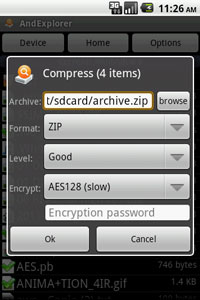
- Standard ZIP encryption support added.
- Android 1.5 support bug fixed.
v2.1:
- Encrypted ZIP (i.e. password protected) support added.
- Search (SDCard) feature added [Pro version only].
- ZIP compression support added [Pro version only].
- Multiple send feature added.
- 80% font scale option added.
- Home folder option added.
- Android 3.2 and 4.0 support.
AndExplorer is a free file manager for Android devices. It allows browsing files and folders stored on device and sdcard. It can sort by name, size and date. Copy/Paste, rename, delete, create folder, send file as email attachment features are available.
It is able to uncompress ZIP, GZIP and TAR files too. Encrypted ZIP are supported. It can be called from another application through Intent facilities. No permission other than storage/write one is needed. AndExplorerPro provides search and ZIP archive support.
Main features:
- List files and folders sorted by name, size and date.
- Open file (HTML, MP3, Text, Video, Office ...) on device.
- APK install support.
- Uncompress support for ZIP, GZIP and TAR files.
- Encrypted ZIP support
- ZIP compression support
- Regular and UTF-8 encoding support for ZIP.
- Multiple files and folders selection support.
- Rename file(s) support.
- Delete file(s) support.
- Create folder(s) support.
- Cut/Copy/Paste support.
- Files/Folders details support.
- Search support
- Send file support (as email attachment, bluetooth, ...).
- Back button support.
- Show hidden files support.
- Optional "Tip of day".
- Intent to select file and/or directory (file extension filtering)
- Intent to Save As...
- Intent to uncompress file into SD Card.
- App2SD support.
- English, French, German, Spanish, Chinese, Japanese, Polish, Russian, Korean, Portuguese, Romanian, Serbian and Brazilian language support.

Download
Labels: Android 1.0 and up, Android Apps, File Manager, Tools
File Expert v4.1.0 Apk
File Expert v4.1.0 Apk Size : 1.9 MB Requires Android:2.1 and up Android Market Link - Visit Developer - Visit | |
v4.1.0 change log:
1. Fix a bug when copying files on vdisk cloud storage
2. Fix a bug when renaming a file
3. Change the way to donate, you can buy File Expert Donate Plugin from Android market to donate.
Powerful File Manager/WIFI File Transfer Web & FTP/App Manager - ALL in ONE
Best & Leading Android file manager of all time with enhanced WIFI sharing and management, root explorer and Bluetooth support! More than 6 millions of users worldwide and still fast growing! Join us today!
* All basic file operations - Copy, Paste, Move, Create and Rename your files and folders
* FTP/HTTP Server - Share & Manage your files without a USB cable, just like with Web Sharing or WIFI File Explorer, but we do even more because we can provide both Web & FTP transferring support. Web management featuring a Windows style interface!
* Root access to system folders and files like Root Explorer. Remount those locations to read write. Requires rooted phone to function. This feature is in BETA testing. Use it on your own risk.
* SMB, FTP, SFTP and FTPS Client - Access your host computer from your phone, using your phone to manage your PC via WIFI with SMB, FTP, SFTP or FTPS
* Bluetooth - Sharing your files over Bluetooth OBEX FTP. Send any files via Bluetooth OPP
* NFC Support. You can use NFC-enabled phone to transfer files and apps.
* WiFi Send. Directly send files via WiFi between File Expert powered phones
* App Manager - Uninstall/Backup apps. We know that many apps on the market can do this, but none can do this work silently. We're the ONLY app that can install and uninstall apps silently, which makes your batch process faster and cooler. Silent capabilities require a rooted phone to function.
* Archive manager - Create and decompress ZIP archive, Decompress RAR. You can view your ZIP/RAR/GZIP/TAR/TGZ/BZ file just like accessing a folder and directly decompress unique files and folders
* Thumbnails - supports jpg/png/mp3/mp4/3gp thumbnails
* Text Viewer
* Image Viewer - supports both local and remote folder
* Search SD card, perform operations on search results
* Help your player to play media that stores on SMB share (your player needs to support HTTP streaming). WE are the ONLY file manager that can directly open some types of videos over SMB network
* File Picker - Let FE to help you anywhere you want :)
* Theme support - Choose themes that you love for FREE!
Why choose FE? Here are the reasons:
1. No ADs and it's FREE
2. Gives you almost everything you need to manage your phone's resources
3. Smaller size than competitors like ES and Astro
4. Acceptable performance
5. Free technical support via email
6. Clear User Interface, and most operations can be done only in touch
7. The ONLY file manager that supports both PC 2 phone & phone 2 PC wifi file transfer and can directly play some videos and music via SMB
8. Root access support
9. Themes
We know that Astro is great but you have to buy Pro version in order to remove annoying ADs. We can provide all functions that Astro does and offer you even more useful features like Web sharing support. Why not give us a try?
Download
Labels: Android 2.1 and up, Android Apps, File Manager, Tools
X-plore file manager v2.47 Apk
| X-plore file manager v2.47 Apk Size : 688 KB Requires Android:2.1 and up Android Market Link - Visit Developer - Visit |
v2.47 change log:
- New text file creating
- Setting file permissions (on files in root)
- Desktop shortcuts also to files
- Config option: open APK as ZIP by default
- Config option: alternative swipe to switch pane
- Fixed Rar extract bug
X-plore is dual-pane file explorer with tree view and root access.
Highlights:
* Dual-pane tree view
* Root access (on rooted devices), also allowing changes to read-only files
* Shows all internal and external memory locations
* Seamless work with Zip (as if it was normal folder)
* Favorites (folders, Zips) displayable in root
* Basic media info about images, video and audio files
* Built-in viewers for images, video, audio, text
* Hex viewer
* Fast Image viewer with zoom and slide to previous/next images in folder
* Thumbnails for images and video as well as for various file types (depending on associated application)
* Ability to clear default application handlers
* Multi-selection - always available, yet not disturbing
* Search files in folders (also in Zip or in search results)
* View APK files as ZIP
* Configurable buttons and key shortcuts
X-plore allows you to see inside of your Android phone or tablet.
This is a dual-pane explorer, which means that there're two folders shown at same time, and common operation such as copying files are done from one pane to another.
And X-plore shows folder hierarchy in a tree view. This offers clear orientation on where in file system you currently are, and fast switching to other location.
Currently selected folder and files are highlighed, while other folders/files have slighly darker background.
You may explore internals of the device, and if you're power user and have your device rooted, you can make changes to system data - backup files, remove unwanted applications, etc.
If you're standard user, you may choose to hide internal memory from view and be sure not to mess with system.
You can comfortably see contents of your external memories, either be it built-in high capacity memory, external memory card, or possibly USB memory stick attached to your tablet. All these memory types are listed in main level, you don't need to search for their folders on the device.
Where it makes sense, X-plore tries to tell more about the file. This means showing thumbnails for images and video, and displaying basic media information about music files.
Main operations are related to managing files and folders - viewing, copying, moving, deleting, compressing to Zip, extracting, renaming, sharing, and more.
Main interaction is done by touch screen, clicking on folders or files to open files, or long-click to open context menu which contains options which can be done on particular clicked item, or multiple selected items.
Multi-selection allows to do operation on more files at once. Files can be selected by clicking check box. It is also possible to select all files in a folder, or clear selection, by clicking parent folder's check box.
Opening file may mean to use one of built-in viewer for most popular file types: images, audio, video and text.
Or you may configure X-plore to use system application for opening files, in which case system-predefined application that can open particular file is launched.
Archives (currently supported is Zip) are displayed as other folders. You may open them, see contents, and do standard operations that you'd do on files - rename, delete, copy from/to, etc. You don't feel other difference from normal file system, other than operation may be slower for larger Zip files due to need of recompression.
Additional interaction is possible by button bar, which is between two panes, and is fully configurable. You may put buttons of your desired operations here, and change ordering.
Buttons in this bar become enabled or disabled automatically depending on if it is possible to perform given operation.
Another input comes from configurable keyboard shortcuts. Many android devices are mainly controlled by touch screens, and have minimal buttons or keys. Even on such device, you may assign action to volume keys.
And on devices with full hardware keyboard, many operations may be (and are by default) assigned to various keys.
Download
Labels: Android 2.1 and up, Android Apps, File Manager, Tools
ASTRO File Manager v3.1.288 Apk
 | ASTRO File Manager v3.1.288 Apk Size : 2.4 MB Requires Android:1.5 and up Android Market Link - Visit Developer - Visit |
v3.1.288 change log:
- Several minor bugs were fixed.
ASTRO File Manager helps organize your pictures, music, videos and other files.
ASTRO File Manager has 20 million downloads on the Android Market and is by far the leader! It's like Windows Explorer or Mac’s Finder for your phone or tablet and allows you to easily organize all of your files.
It’s picture view works better than standard galleries. Pictures, music, documents, videos... ASTRO is in most Top Ten Android App lists and has been recommended in books like Amazing Android Apps.
Features include:
- File management
- File and/or app backup
- Image and text viewers
- Networking
- Bluetooth
- SFTP
- Zip/ Tar
- Downloader
- Thumbnails
- Search files
- Application manager
- Task manager
- Attachments and more…
Please visit our new support portal for a Quick Start Guide, FAQ's and Documentation. http://support.metago.net.
ASTRO currently supports 11 languages including: English, French, Spanish, Italian, German, Japanese, Korean, Traditional Chinese, Simplified Chinese, Russian & Portuguese.


Download
Labels: Android 1.5 and up, Android Apps, File Manager, Tools
X-plore file manager v2.45 Apk
| X-plore file manager v2.45 Apk Size : 688 KB Requires Android:2.1 and up Android Market Link - Visit Developer - Visit |
v2.45 change log:
- Sharing files from any location: local, network, zip (works on Android 2.3+)
- More system integration:
- add folder shortcuts to Home screen
- open Zip, Rar in X-plore
- selecting file (e.g. attachment from Email app)
- fixed bug in Rar extracting
- better video thumbnails
X-plore is dual-pane file explorer with tree view and root access.
Highlights:
* Dual-pane tree view
* Root access (on rooted devices), also allowing changes to read-only files
* Shows all internal and external memory locations
* Seamless work with Zip (as if it was normal folder)
* Favorites (folders, Zips) displayable in root
* Basic media info about images, video and audio files
* Built-in viewers for images, video, audio, text
* Hex viewer
* Fast Image viewer with zoom and slide to previous/next images in folder
* Thumbnails for images and video as well as for various file types (depending on associated application)
* Ability to clear default application handlers
* Multi-selection - always available, yet not disturbing
* Search files in folders (also in Zip or in search results)
* View APK files as ZIP
* Configurable buttons and key shortcuts
X-plore allows you to see inside of your Android phone or tablet.
This is a dual-pane explorer, which means that there're two folders shown at same time, and common operation such as copying files are done from one pane to another.
And X-plore shows folder hierarchy in a tree view. This offers clear orientation on where in file system you currently are, and fast switching to other location.
Currently selected folder and files are highlighed, while other folders/files have slighly darker background.
You may explore internals of the device, and if you're power user and have your device rooted, you can make changes to system data - backup files, remove unwanted applications, etc.
If you're standard user, you may choose to hide internal memory from view and be sure not to mess with system.
You can comfortably see contents of your external memories, either be it built-in high capacity memory, external memory card, or possibly USB memory stick attached to your tablet. All these memory types are listed in main level, you don't need to search for their folders on the device.
Where it makes sense, X-plore tries to tell more about the file. This means showing thumbnails for images and video, and displaying basic media information about music files.
Main operations are related to managing files and folders - viewing, copying, moving, deleting, compressing to Zip, extracting, renaming, sharing, and more.
Main interaction is done by touch screen, clicking on folders or files to open files, or long-click to open context menu which contains options which can be done on particular clicked item, or multiple selected items.
Multi-selection allows to do operation on more files at once. Files can be selected by clicking check box. It is also possible to select all files in a folder, or clear selection, by clicking parent folder's check box.
Opening file may mean to use one of built-in viewer for most popular file types: images, audio, video and text.
Or you may configure X-plore to use system application for opening files, in which case system-predefined application that can open particular file is launched.
Archives (currently supported is Zip) are displayed as other folders. You may open them, see contents, and do standard operations that you'd do on files - rename, delete, copy from/to, etc. You don't feel other difference from normal file system, other than operation may be slower for larger Zip files due to need of recompression.
Additional interaction is possible by button bar, which is between two panes, and is fully configurable. You may put buttons of your desired operations here, and change ordering.
Buttons in this bar become enabled or disabled automatically depending on if it is possible to perform given operation.
Another input comes from configurable keyboard shortcuts. Many android devices are mainly controlled by touch screens, and have minimal buttons or keys. Even on such device, you may assign action to volume keys.
And on devices with full hardware keyboard, many operations may be (and are by default) assigned to various keys.
Download
Labels: Android 2.1 and up, Android Apps, File Manager, Tools
X-plore file manager v2.40 Apk
| X-plore file manager v2.40 Apk Size : 688 KB Requires Android:2.1 and up Android Market Link - Visit Developer - Visit |
v2.40 change log:
- FTP/FTPS servers
- Spanish, Korean localization
- Improved image viewer
X-plore is dual-pane file explorer with tree view and root access.
Highlights:
* Dual-pane tree view
* Root access (on rooted devices), also allowing changes to read-only files
* Shows all internal and external memory locations
* Seamless work with Zip (as if it was normal folder)
* Favorites (folders, Zips) displayable in root
* Basic media info about images, video and audio files
* Built-in viewers for images, video, audio, text
* Hex viewer
* Fast Image viewer with zoom and slide to previous/next images in folder
* Thumbnails for images and video as well as for various file types (depending on associated application)
* Ability to clear default application handlers
* Multi-selection - always available, yet not disturbing
* Search files in folders (also in Zip or in search results)
* View APK files as ZIP
* Configurable buttons and key shortcuts
X-plore allows you to see inside of your Android phone or tablet.
This is a dual-pane explorer, which means that there're two folders shown at same time, and common operation such as copying files are done from one pane to another.
And X-plore shows folder hierarchy in a tree view. This offers clear orientation on where in file system you currently are, and fast switching to other location.
Currently selected folder and files are highlighed, while other folders/files have slighly darker background.
You may explore internals of the device, and if you're power user and have your device rooted, you can make changes to system data - backup files, remove unwanted applications, etc.
If you're standard user, you may choose to hide internal memory from view and be sure not to mess with system.
You can comfortably see contents of your external memories, either be it built-in high capacity memory, external memory card, or possibly USB memory stick attached to your tablet. All these memory types are listed in main level, you don't need to search for their folders on the device.
Where it makes sense, X-plore tries to tell more about the file. This means showing thumbnails for images and video, and displaying basic media information about music files.
Main operations are related to managing files and folders - viewing, copying, moving, deleting, compressing to Zip, extracting, renaming, sharing, and more.
Main interaction is done by touch screen, clicking on folders or files to open files, or long-click to open context menu which contains options which can be done on particular clicked item, or multiple selected items.
Multi-selection allows to do operation on more files at once. Files can be selected by clicking check box. It is also possible to select all files in a folder, or clear selection, by clicking parent folder's check box.
Opening file may mean to use one of built-in viewer for most popular file types: images, audio, video and text.
Or you may configure X-plore to use system application for opening files, in which case system-predefined application that can open particular file is launched.
Archives (currently supported is Zip) are displayed as other folders. You may open them, see contents, and do standard operations that you'd do on files - rename, delete, copy from/to, etc. You don't feel other difference from normal file system, other than operation may be slower for larger Zip files due to need of recompression.
Additional interaction is possible by button bar, which is between two panes, and is fully configurable. You may put buttons of your desired operations here, and change ordering.
Buttons in this bar become enabled or disabled automatically depending on if it is possible to perform given operation.
Another input comes from configurable keyboard shortcuts. Many android devices are mainly controlled by touch screens, and have minimal buttons or keys. Even on such device, you may assign action to volume keys.
And on devices with full hardware keyboard, many operations may be (and are by default) assigned to various keys.
Download Or Download
Labels: Android 2.1 and up, Android Apps, File Manager, Tools
Doggie - ICS File Explorer v1.1 Apk
 | Doggie - ICS File Explorer v1.1 Apk Size : 996 KB Requires Android:1.6 and up Android Market Link - Visit Developer - Visit |
v1.1 change log:
- Initial release
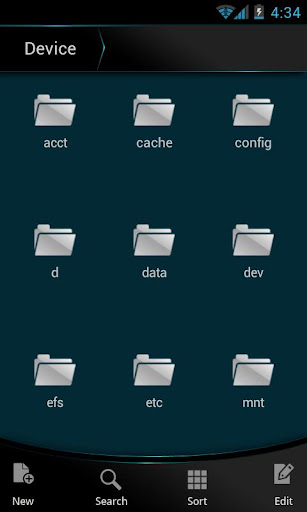
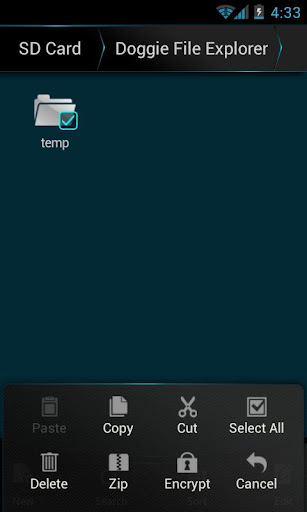
Doggie-ICS File Explorer, designed for Android 4.0 Ice Cream Sandwich, it also enables Android 1.6, 2.* device users to experience ICS.
Organize your file and folder quickly and intelligently;
Edit, sort, search, are always ready for you.
Features:
->Easy to view and manage a mass of stuff, files and folders in your device, just with a click.
->Quickly switch the file directory and open file & folder.
->"FAVORITES", super convenient and fast to check your commonly used files or folders.
->Promptly explore and search files.
->Edit/create /copy/paste/cut/rename and more functions provided.
->Zip files.
->A privacy service provided! You can encrypt important files and folders, cooler and safer.
->Get easy online storage by Connect to Dropbox
Doggie file explorer is totally free, designed & developed for Android device users. More functions are on the way.
Download
Labels: Android 1.6 and up, Android Apps, File Manager, Tools
File Expert v4.0.9 Apk
File Expert v4.0.9 Apk Size : 1.9 MB Requires Android:2.1 and up Android Market Link - Visit Developer - Visit | |
v4.0.9 change log:
1. Fix an crash issue on 2.1 and 2.2 ROM when searching for files
2. Fix a crash issue when working with KDrive cloud storage
Powerful File Manager/WIFI File Transfer Web & FTP/App Manager - ALL in ONE
Best & Leading Android file manager of all time with enhanced WIFI sharing and management, root explorer and Bluetooth support! More than 6 millions of users worldwide and still fast growing! Join us today!
* All basic file operations - Copy, Paste, Move, Create and Rename your files and folders
* FTP/HTTP Server - Share & Manage your files without a USB cable, just like with Web Sharing or WIFI File Explorer, but we do even more because we can provide both Web & FTP transferring support. Web management featuring a Windows style interface!
* Root access to system folders and files like Root Explorer. Remount those locations to read write. Requires rooted phone to function. This feature is in BETA testing. Use it on your own risk.
* SMB, FTP, SFTP and FTPS Client - Access your host computer from your phone, using your phone to manage your PC via WIFI with SMB, FTP, SFTP or FTPS
* Bluetooth - Sharing your files over Bluetooth OBEX FTP. Send any files via Bluetooth OPP
* NFC Support. You can use NFC-enabled phone to transfer files and apps.
* WiFi Send. Directly send files via WiFi between File Expert powered phones
* App Manager - Uninstall/Backup apps. We know that many apps on the market can do this, but none can do this work silently. We're the ONLY app that can install and uninstall apps silently, which makes your batch process faster and cooler. Silent capabilities require a rooted phone to function.
* Archive manager - Create and decompress ZIP archive, Decompress RAR. You can view your ZIP/RAR/GZIP/TAR/TGZ/BZ file just like accessing a folder and directly decompress unique files and folders
* Thumbnails - supports jpg/png/mp3/mp4/3gp thumbnails
* Text Viewer
* Image Viewer - supports both local and remote folder
* Search SD card, perform operations on search results
* Help your player to play media that stores on SMB share (your player needs to support HTTP streaming). WE are the ONLY file manager that can directly open some types of videos over SMB network
* File Picker - Let FE to help you anywhere you want :)
* Theme support - Choose themes that you love for FREE!
Why choose FE? Here are the reasons:
1. No ADs and it's FREE
2. Gives you almost everything you need to manage your phone's resources
3. Smaller size than competitors like ES and Astro
4. Acceptable performance
5. Free technical support via email
6. Clear User Interface, and most operations can be done only in touch
7. The ONLY file manager that supports both PC 2 phone & phone 2 PC wifi file transfer and can directly play some videos and music via SMB
8. Root access support
9. Themes
We know that Astro is great but you have to buy Pro version in order to remove annoying ADs. We can provide all functions that Astro does and offer you even more useful features like Web sharing support. Why not give us a try?
Download
Labels: Android 2.1 and up, Android Apps, File Manager, Tools
File Expert v4.0.8 Apk
File Expert v4.0.8 Apk Size : 1.9 MB Requires Android:2.1 and up Android Market Link - Visit Developer - Visit | |
v4.0.8 change log:
1. Huge improve search performance
2. Reported bug fixes
Powerful File Manager/WIFI File Transfer Web & FTP/App Manager - ALL in ONE
Best & Leading Android file manager of all time with enhanced WIFI sharing and management, root explorer and Bluetooth support! More than 6 millions of users worldwide and still fast growing! Join us today!
* All basic file operations - Copy, Paste, Move, Create and Rename your files and folders
* FTP/HTTP Server - Share & Manage your files without a USB cable, just like with Web Sharing or WIFI File Explorer, but we do even more because we can provide both Web & FTP transferring support. Web management featuring a Windows style interface!
* Root access to system folders and files like Root Explorer. Remount those locations to read write. Requires rooted phone to function. This feature is in BETA testing. Use it on your own risk.
* SMB, FTP, SFTP and FTPS Client - Access your host computer from your phone, using your phone to manage your PC via WIFI with SMB, FTP, SFTP or FTPS
* Bluetooth - Sharing your files over Bluetooth OBEX FTP. Send any files via Bluetooth OPP
* NFC Support. You can use NFC-enabled phone to transfer files and apps.
* WiFi Send. Directly send files via WiFi between File Expert powered phones
* App Manager - Uninstall/Backup apps. We know that many apps on the market can do this, but none can do this work silently. We're the ONLY app that can install and uninstall apps silently, which makes your batch process faster and cooler. Silent capabilities require a rooted phone to function.
* Archive manager - Create and decompress ZIP archive, Decompress RAR. You can view your ZIP/RAR/GZIP/TAR/TGZ/BZ file just like accessing a folder and directly decompress unique files and folders
* Thumbnails - supports jpg/png/mp3/mp4/3gp thumbnails
* Text Viewer
* Image Viewer - supports both local and remote folder
* Search SD card, perform operations on search results
* Help your player to play media that stores on SMB share (your player needs to support HTTP streaming). WE are the ONLY file manager that can directly open some types of videos over SMB network
* File Picker - Let FE to help you anywhere you want :)
* Theme support - Choose themes that you love for FREE!
Why choose FE? Here are the reasons:
1. No ADs and it's FREE
2. Gives you almost everything you need to manage your phone's resources
3. Smaller size than competitors like ES and Astro
4. Acceptable performance
5. Free technical support via email
6. Clear User Interface, and most operations can be done only in touch
7. The ONLY file manager that supports both PC 2 phone & phone 2 PC wifi file transfer and can directly play some videos and music via SMB
8. Root access support
9. Themes
We know that Astro is great but you have to buy Pro version in order to remove annoying ADs. We can provide all functions that Astro does and offer you even more useful features like Web sharing support. Why not give us a try?
Download
Labels: Android 2.1 and up, Android Apps, File Manager, Tools
X-plore file manager v2.30 Apk
| X-plore file manager v2.30 Apk Size : 688 KB Requires Android:2.1 and up Android Market Link - Visit Developer - Visit |
v2.30 change log:
- Picasa image albums - one-click login to your Picasa web albums - browse, add, delete albums or photos, write captions
- More info: http://bit.ly/picwebal
- Improved performance of thumbnails creation
X-plore is dual-pane file explorer with tree view and root access.
Highlights:
* Dual-pane tree view
* Root access (on rooted devices), also allowing changes to read-only files
* Shows all internal and external memory locations
* Seamless work with Zip (as if it was normal folder)
* Favorites (folders, Zips) displayable in root
* Basic media info about images, video and audio files
* Built-in viewers for images, video, audio, text
* Hex viewer
* Fast Image viewer with zoom and slide to previous/next images in folder
* Thumbnails for images and video as well as for various file types (depending on associated application)
* Ability to clear default application handlers
* Multi-selection - always available, yet not disturbing
* Search files in folders (also in Zip or in search results)
* View APK files as ZIP
* Configurable buttons and key shortcuts
X-plore allows you to see inside of your Android phone or tablet.
This is a dual-pane explorer, which means that there're two folders shown at same time, and common operation such as copying files are done from one pane to another.
And X-plore shows folder hierarchy in a tree view. This offers clear orientation on where in file system you currently are, and fast switching to other location.
Currently selected folder and files are highlighed, while other folders/files have slighly darker background.
You may explore internals of the device, and if you're power user and have your device rooted, you can make changes to system data - backup files, remove unwanted applications, etc.
If you're standard user, you may choose to hide internal memory from view and be sure not to mess with system.
You can comfortably see contents of your external memories, either be it built-in high capacity memory, external memory card, or possibly USB memory stick attached to your tablet. All these memory types are listed in main level, you don't need to search for their folders on the device.
Where it makes sense, X-plore tries to tell more about the file. This means showing thumbnails for images and video, and displaying basic media information about music files.
Main operations are related to managing files and folders - viewing, copying, moving, deleting, compressing to Zip, extracting, renaming, sharing, and more.
Main interaction is done by touch screen, clicking on folders or files to open files, or long-click to open context menu which contains options which can be done on particular clicked item, or multiple selected items.
Multi-selection allows to do operation on more files at once. Files can be selected by clicking check box. It is also possible to select all files in a folder, or clear selection, by clicking parent folder's check box.
Opening file may mean to use one of built-in viewer for most popular file types: images, audio, video and text.
Or you may configure X-plore to use system application for opening files, in which case system-predefined application that can open particular file is launched.
Archives (currently supported is Zip) are displayed as other folders. You may open them, see contents, and do standard operations that you'd do on files - rename, delete, copy from/to, etc. You don't feel other difference from normal file system, other than operation may be slower for larger Zip files due to need of recompression.
Additional interaction is possible by button bar, which is between two panes, and is fully configurable. You may put buttons of your desired operations here, and change ordering.
Buttons in this bar become enabled or disabled automatically depending on if it is possible to perform given operation.
Another input comes from configurable keyboard shortcuts. Many android devices are mainly controlled by touch screens, and have minimal buttons or keys. Even on such device, you may assign action to volume keys.
And on devices with full hardware keyboard, many operations may be (and are by default) assigned to various keys.
Download Or Download
Labels: Android 2.1 and up, Android Apps, File Manager, Tools
X-plore file manager v2.21 Apk
| X-plore file manager 2.21 Apk Size : 688 KB Requires Android:2.1 and up Android Market Link - Visit Developer - Visit |
v2.21 change log:
- French localization
- Fixed "use Market version" notification
X-plore is dual-pane file explorer with tree view and root access.
Highlights:
* Dual-pane tree view
* Root access (on rooted devices), also allowing changes to read-only files
* Shows all internal and external memory locations
* Seamless work with Zip (as if it was normal folder)
* Favorites (folders, Zips) displayable in root
* Basic media info about images, video and audio files
* Built-in viewers for images, video, audio, text
* Hex viewer
* Fast Image viewer with zoom and slide to previous/next images in folder
* Thumbnails for images and video as well as for various file types (depending on associated application)
* Ability to clear default application handlers
* Multi-selection - always available, yet not disturbing
* Search files in folders (also in Zip or in search results)
* View APK files as ZIP
* Configurable buttons and key shortcuts
X-plore allows you to see inside of your Android phone or tablet.
This is a dual-pane explorer, which means that there're two folders shown at same time, and common operation such as copying files are done from one pane to another.
And X-plore shows folder hierarchy in a tree view. This offers clear orientation on where in file system you currently are, and fast switching to other location.
Currently selected folder and files are highlighed, while other folders/files have slighly darker background.
You may explore internals of the device, and if you're power user and have your device rooted, you can make changes to system data - backup files, remove unwanted applications, etc.
If you're standard user, you may choose to hide internal memory from view and be sure not to mess with system.
You can comfortably see contents of your external memories, either be it built-in high capacity memory, external memory card, or possibly USB memory stick attached to your tablet. All these memory types are listed in main level, you don't need to search for their folders on the device.
Where it makes sense, X-plore tries to tell more about the file. This means showing thumbnails for images and video, and displaying basic media information about music files.
Main operations are related to managing files and folders - viewing, copying, moving, deleting, compressing to Zip, extracting, renaming, sharing, and more.
Main interaction is done by touch screen, clicking on folders or files to open files, or long-click to open context menu which contains options which can be done on particular clicked item, or multiple selected items.
Multi-selection allows to do operation on more files at once. Files can be selected by clicking check box. It is also possible to select all files in a folder, or clear selection, by clicking parent folder's check box.
Opening file may mean to use one of built-in viewer for most popular file types: images, audio, video and text.
Or you may configure X-plore to use system application for opening files, in which case system-predefined application that can open particular file is launched.
Archives (currently supported is Zip) are displayed as other folders. You may open them, see contents, and do standard operations that you'd do on files - rename, delete, copy from/to, etc. You don't feel other difference from normal file system, other than operation may be slower for larger Zip files due to need of recompression.
Additional interaction is possible by button bar, which is between two panes, and is fully configurable. You may put buttons of your desired operations here, and change ordering.
Buttons in this bar become enabled or disabled automatically depending on if it is possible to perform given operation.
Another input comes from configurable keyboard shortcuts. Many android devices are mainly controlled by touch screens, and have minimal buttons or keys. Even on such device, you may assign action to volume keys.
And on devices with full hardware keyboard, many operations may be (and are by default) assigned to various keys.
Download Or Download
Labels: Android 2.1 and up, Android Apps, File Manager, Tools
File Expert v4.0.7 Apk
File Expert v4.0.7 Apk Size : 1.9 MB Requires Android:2.1 and up Android Market Link - Visit Developer - Visit | |
v4.0.7 change log:
1. Add new sharing method Facebook, SMS and Gmail
2. Fix file paste bug
3. Add a new feature that allows users to LIKE an installed app, this will help us to add new apps to Get New Apps section
4. Performance optimization and bug fixing
Powerful File Manager/WIFI File Transfer Web & FTP/App Manager - ALL in ONE
Best & Leading Android file manager of all time with enhanced WIFI sharing and management, root explorer and Bluetooth support! More than 6 millions of users worldwide and still fast growing! Join us today!
* All basic file operations - Copy, Paste, Move, Create and Rename your files and folders
* FTP/HTTP Server - Share & Manage your files without a USB cable, just like with Web Sharing or WIFI File Explorer, but we do even more because we can provide both Web & FTP transferring support. Web management featuring a Windows style interface!
* Root access to system folders and files like Root Explorer. Remount those locations to read write. Requires rooted phone to function. This feature is in BETA testing. Use it on your own risk.
* SMB, FTP, SFTP and FTPS Client - Access your host computer from your phone, using your phone to manage your PC via WIFI with SMB, FTP, SFTP or FTPS
* Bluetooth - Sharing your files over Bluetooth OBEX FTP. Send any files via Bluetooth OPP
* NFC Support. You can use NFC-enabled phone to transfer files and apps.
* WiFi Send. Directly send files via WiFi between File Expert powered phones
* App Manager - Uninstall/Backup apps. We know that many apps on the market can do this, but none can do this work silently. We're the ONLY app that can install and uninstall apps silently, which makes your batch process faster and cooler. Silent capabilities require a rooted phone to function.
* Archive manager - Create and decompress ZIP archive, Decompress RAR. You can view your ZIP/RAR/GZIP/TAR/TGZ/BZ file just like accessing a folder and directly decompress unique files and folders
* Thumbnails - supports jpg/png/mp3/mp4/3gp thumbnails
* Text Viewer
* Image Viewer - supports both local and remote folder
* Search SD card, perform operations on search results
* Help your player to play media that stores on SMB share (your player needs to support HTTP streaming). WE are the ONLY file manager that can directly open some types of videos over SMB network
* File Picker - Let FE to help you anywhere you want :)
* Theme support - Choose themes that you love for FREE!
Why choose FE? Here are the reasons:
1. No ADs and it's FREE
2. Gives you almost everything you need to manage your phone's resources
3. Smaller size than competitors like ES and Astro
4. Acceptable performance
5. Free technical support via email
6. Clear User Interface, and most operations can be done only in touch
7. The ONLY file manager that supports both PC 2 phone & phone 2 PC wifi file transfer and can directly play some videos and music via SMB
8. Root access support
9. Themes
We know that Astro is great but you have to buy Pro version in order to remove annoying ADs. We can provide all functions that Astro does and offer you even more useful features like Web sharing support. Why not give us a try?
Download
Labels: Android 2.1 and up, Android Apps, File Manager, Tools
File Expert 4.0.6 Apk
File Expert 4.0.6 Apk Size : 1.9 MB Requires Android:2.1 and up Android Market Link - Visit Developer - Visit | |
v4.0.6 change log:
1. Add social share feature, you can share market apps and cloud files to some social sites
2. Add support for sdcard-ext devices
3. Add support for a new cloud storage provider KDrive
4. Performance optimization and bug fixing
Powerful File Manager/WIFI File Transfer Web & FTP/App Manager - ALL in ONE
Best & Leading Android file manager of all time with enhanced WIFI sharing and management, root explorer and Bluetooth support! More than 6 millions of users worldwide and still fast growing! Join us today!
* All basic file operations - Copy, Paste, Move, Create and Rename your files and folders
* FTP/HTTP Server - Share & Manage your files without a USB cable, just like with Web Sharing or WIFI File Explorer, but we do even more because we can provide both Web & FTP transferring support. Web management featuring a Windows style interface!
* Root access to system folders and files like Root Explorer. Remount those locations to read write. Requires rooted phone to function. This feature is in BETA testing. Use it on your own risk.
* SMB, FTP, SFTP and FTPS Client - Access your host computer from your phone, using your phone to manage your PC via WIFI with SMB, FTP, SFTP or FTPS
* Bluetooth - Sharing your files over Bluetooth OBEX FTP. Send any files via Bluetooth OPP
* NFC Support. You can use NFC-enabled phone to transfer files and apps.
* WiFi Send. Directly send files via WiFi between File Expert powered phones
* App Manager - Uninstall/Backup apps. We know that many apps on the market can do this, but none can do this work silently. We're the ONLY app that can install and uninstall apps silently, which makes your batch process faster and cooler. Silent capabilities require a rooted phone to function.
* Archive manager - Create and decompress ZIP archive, Decompress RAR. You can view your ZIP/RAR/GZIP/TAR/TGZ/BZ file just like accessing a folder and directly decompress unique files and folders
* Thumbnails - supports jpg/png/mp3/mp4/3gp thumbnails
* Text Viewer
* Image Viewer - supports both local and remote folder
* Search SD card, perform operations on search results
* Help your player to play media that stores on SMB share (your player needs to support HTTP streaming). WE are the ONLY file manager that can directly open some types of videos over SMB network
* File Picker - Let FE to help you anywhere you want :)
* Theme support - Choose themes that you love for FREE!
Why choose FE? Here are the reasons:
1. No ADs and it's FREE
2. Gives you almost everything you need to manage your phone's resources
3. Smaller size than competitors like ES and Astro
4. Acceptable performance
5. Free technical support via email
6. Clear User Interface, and most operations can be done only in touch
7. The ONLY file manager that supports both PC 2 phone & phone 2 PC wifi file transfer and can directly play some videos and music via SMB
8. Root access support
9. Themes
We know that Astro is great but you have to buy Pro version in order to remove annoying ADs. We can provide all functions that Astro does and offer you even more useful features like Web sharing support. Why not give us a try?
Download
Labels: Android 2.1 and up, Android Apps, File Manager, Tools