Showing posts with label Audio Tools. Show all posts
Showing posts with label Audio Tools. Show all posts
Volume Ace v2.4.0 Apk

Volume Ace v2.4.0 Apk | 364 KB | Mediafire
Requires Android:1.6 and up
Your device volume settings at finger tip. Volume Ace is a volume manager that allow you to manage your device volume levels in a practice single place. You can create profiles and switch or select them straight from the widgets. Schedule profiles to apply automatically.
v2.4.0 update:
• Now Ringtone, Notification and Alarm tones are saved with profiles.
• Galaxy Nexus display fix
• Changes for ICS
Features:
• Profiles : Create your own volume presets.
• Scheduler : Schedule profiles to apply automatically at the time and day you choose.
• Plugs : Automatically switch to profiles of choice when plugging Earphones, Desk or Car.
• Set Mode(From widget too): Silent, Vibration & Normal.
• Cycle through profiles by tapping widget
• Tone picker for Ringtone, Notification and Alarm
• Sounds while adjusting volume (using the actual tone)
• Widgets with volume levels and profiles
• Custom colors/style to widgets and main screen (Default, blue, green, red, white, Vintage)
• Volume Locker: Prevent ringer and/or media volume to be changed outside the app.
• Bluetooth volume
Download
Download - Market
Labels: Android 1.6 and up, Android Apps, Android Widget, Audio Tools
Electrum Drum Machine/Sampler v4.5.6 Apk
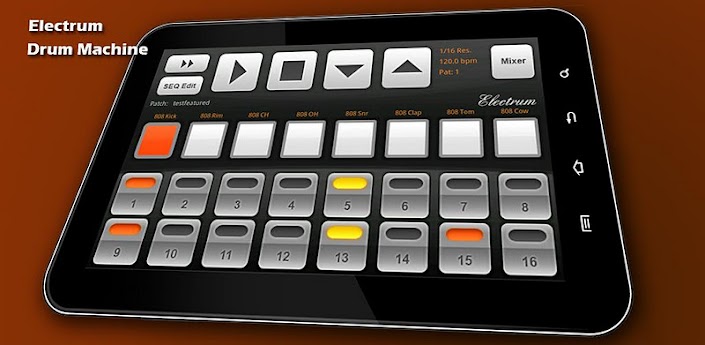
Electrum Drum Machine/Sampler v4.5.6 Apk | 5.2 MB | Mediafire | HF | FS
Requires Android:1.5 and up
Electrum Drum Machine/Sampler. Pattern based music composition. Programmable drum machine.
v4.5.6 update:
- Sample name was not being displayed on sample dialog, fixed. Switched pitch change to linear interpolation, now 100% musically accurate.
● WAV file import - Load YOUR OWN SAMPLES from SDCARD. Long press a sound button to bring up the sample loading dialog.
Use my Sonic Chop app (sold separate) to chop samples from MP3's on your device and load them right into Electrum!
● Use samples and loops to make beats and songs.
● Preview samples LIVE while the machine is playing, they will mix right into the beat.
● Real time playback and editing - no waiting for sound to render before you hear your changes!
● Look at the MENU for more options such as ability to save and load your own custom drumkits - once you've loaded the sounds you like unto the pads and adjusted them you can save the settings as a drumkit, separate from the patch itself!
● RECORD samples with the microphone.
● Stretch loops to fit the current project BPM.
● Edit a sample's start and end point, pitch and pan Left/Right.
● Use other time signatures such as 3/4, 6/8, etc.
● Add some swing to your beats with the SHUFFLE setting.
● Add Delay and Distortion FX to your samples
● Sample accurate playback engine.
● WAV/MIDI/Pad Export-load your song into Fruityloops!
● Sharing - install the Soundcloud app from the market and you can share beats right to soundcloud (see Electrum's Menu->More->Share)
Download Or Download Or Download
Download - Market
Labels: Android 1.5 and up, Android Apps, Audio Tools
ReLoop Loop Sequencer Full v1.9.2 Apk
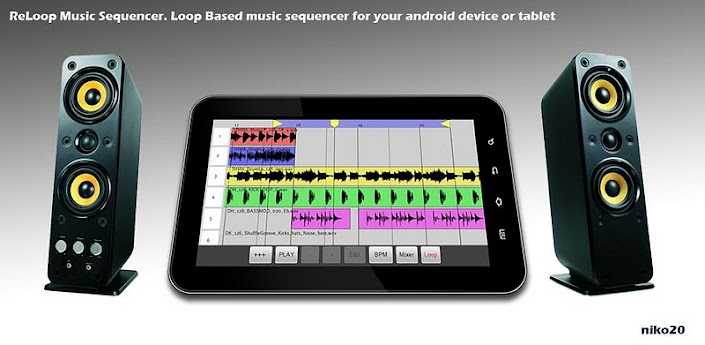
ReLoop Loop Sequencer Full v1.9.2 Apk | 2.3 MB | Mediafire / Multiupload
Requires Android:1.5 and up
Quickly make music using samples and loops, just like Garageband or Sony's ACID. Real time live loop preview, hear how a loop will sound while currently playing what's already programmed.
v1.9.2 update:
- Fixed layout for Android 4.0 (ICS), Added Mute and FX indicator text to tracks
3 real-time FX : Delay, Low pass filter, and Distortion.
Easy to use interface - Drag/Drop loops on the timeline.
- TAP a track number to bring up a screen to load a sample or loop to that track.
- LONG PRESS a track number to bring up the FX dialog for that track.
- TOUCH AND DRAG TO THE RIGHT off a track number to add it's sample to the timeline
- LONG PRESS a sample to select it for further editing.
- LONG PRESS a sample AND DRAG TO THE LEFT OFF THE SCREEN to delete the sample from the timeline.
- LONG PRESS a sample and move it left to right to move its position on the timeline.
- CHECK THE MENU for even more operations such as slice, copy, undo, snap, etc.
CD quality sound (44Khz 16bit stereo).
Download Or Download
Download - Market
Labels: Android 1.5 and up, Android Apps, Audio Tools
CallRecorder v1.0.45 (Alpha) Apk

CallRecorder v1.0.45 Apk | 334 KB | Mediafire / MirrorCreator
Requires Android:2.2 and up
This program records phone calls from the phone line on some phones. Such recording is not usually available out-of-the-box, it needs hardware support in your OS kernel and root access.
v1.0.45 alpha update:
- bug fixes
- open/add contact from the context menu
- 1.0.44 alpha:
- Recording data are now stored in recording files themselves
- UI improvements
- Language selection in settings
If you have an HTC device, you’re in clover if you’ve got a custom ROM. Otherwise, please visit the xda site, there’re plenty. Basically any device is supported, provided that it’s based on a Qualcomm chip, say, their Snapdragons, etc. If your device has no such support, the program still records phone calls, but you need to select Android API in preferences and the recording will most likely proceed from the mike, not from the line. Please feel free to make any comments or send suggestions.
For more information, please, read thread on xda-developers.com – http://forum.xda-developers.com/showthread.php?t=993793
Issue tracker: http://code.skvalex.com/callrecorder/issues
The list of supported devices:
Requires the kernel with 2-way call recording patch and ROOT permissions:
- HTC Desire
- HTC HD2
- Google Nexus One
- HTC Desire HD
- HTC Desire Z
- HTC Desire S
- HTC Incredible S
- HTC Thunderbolt
- HTC Sensation
- HTC EVO 3D (CDMA)
- HTC Hero
- HTC Wildfire
- Acer Liquid mt
- Dell Streak
- ZTE Blade
- HighScreen Cosmo
- Acer Liquid
Use standard API for recording (may record from the mic):
- Motorola Defy (Preferences: Audio source – microphone)
- Sony Ericsson XPERIA mini pro
- Samsung GT-I9000 Galaxy S
- Samsung GT-I9001 Galaxy S Plus
- Samsung GT-I9100 Galaxy S II (Preferences: Audio source – voice uplink, and voice downlink for BT)
- Samsung GT-S5570 Galaxy Mini
- Alcatel OT-990
Download
Download - Market
Labels: Android 2.2 and up, Android Apps, Audio Tools, For Rooted, Tools
Volume Ace v2.3.1 Apk
Volume Ace v2.3.1 Apk | 364 KB | Mediafire / MirrorCreator
Requires Android:1.6 and up
Your device volume settings at finger tip. Volume Ace is a volume manager that allow you to manage your device volume levels in a practice single place. You can create profiles and switch or select them straight from the widgets. Schedule profiles to apply automatically.
v2.3.1 update:
• Galaxy Note Fix
Features:
• Profiles : Create your own volume presets.
• Scheduler : Schedule profiles to apply automatically at the time and day you choose.
• Plugs : Automatically switch to profiles of choice when plugging Earphones, Desk or Car.
• Set Mode(From widget too): Silent, Vibration & Normal.
• Cycle through profiles by tapping widget
• Tone picker for Ringtone, Notification and Alarm
• Sounds while adjusting volume (using the actual tone)
• Widgets with volume levels and profiles
• Custom colors/style to widgets and main screen (Default, blue, green, red, white, Vintage)
• Volume Locker: Prevent ringer and/or media volume to be changed outside the app.
• Bluetooth volume
Download
Download - Market
Labels: Android 1.6 and up, Android Apps, Audio Tools, Tools
Root Toolbox PRO v1.6.4 Apk

Root Toolbox PRO v1.6.4 Apk | 1.5 MB | Mediafire / MirrorCreator
REQUIRES ANDROID:1.6 and up
AndroidApps.Tk
This app is made available for use at your own risk with no warranty of any kind. NANDROID BACKUP BEORE USE!!! Root, Busybox and S-off are require to use most features in this app.
v1.6.4 update:
- SDCard automatically rescaned after unmounting (PRO)
Current Features:
-Reboot/Recovery/Bootloader/HotBoot/Download-Mode
-SetAPN/Backup/Restore
-Wipe Delvik
-Wipe Battery Stats
-Remount System
-Backup/Restor/Flash/Erase Recovery
-Fix permissions
-Launch Hidden Menu
-Fix Market Links
-Sim Settings
-Update Busybox
-CM7 Themes
-Restart Status Bar
-Dual Mount Sdcard + EXT
-System App Remover/Backup/Restore
-Enable/Disable Boot Animation
-Read Logcat
-Display Device Information
-Download Update.zip To Change Sdcard Read Speed
-Install Cyanogen DSP Manager
-Wipe All Webview Cache
-Root flash light
-MD5 Sum Fixer
-Package Manager
-Debug Message
-Install Non-Market App
Download
Download - Market
Labels: Android 1.6 and up, Android Apps, Audio Tools, For Rooted
Subscribe to:
Posts (Atom)