WP7 Notifications v3.1 Apk

WP7 Notifications v3.1 Apk | 204 KB | FS | MS
Requires Android:2.1 and up
WP7 Notifications displays all your Android device's notifications WP7 style. WP7 Notifications greatly improves the way your Android device displays notifications. You can display all your Android notifications in the same way than on Windows Phone 7.
v3.1 update:
- Better support for high resolution devices
- You can now choose vibration patterns (pro)
- You can now activate the notification sound
- You now have 2 actions for swiping on the left
- New quiet hours option
- New reminder option
- Added spanish
--== SUPPORT ==--
For more information and a detailled FAQ, go to http://www.productigeeky.com
If you have any question or suggestion, please contact us.
--== TO ACTIVATE THE SERVICE ==--
To work properly, WP7 Notifications requires that you activate the accessibility service « WP7 Notifications Service » (accessibility services are currently the only way to process notifications on Android systems)
- After installing, click « Open »
- Click « Activate service »
- If it’s not checked, check « Accessibility »
- Check « WP7 Notifications Service »
- Confirm
Your notifications will now be displayed.
--== USING THE APP ==--
When a notification shows up :
- Click on it to launch it
- Swipe it to the right to dismiss it
- Swipe to the left to clear all upcoming notifications
If you use a custom lockscreen app such as MagicLocker or WidgetLocker, the notifications will show above your lockscreen.
--== LITE VS PRO ==--
With the full version of WP7 Notifications :
- You can choose the duration of the notification, and make it permanent
- You can choose to animate the notifications
- You can display a nice shadow under the notification
- You can choose the color for the notification
- You can make your phone wake up when you receive a notification
- You can choose an alternate 2 lines layout
--== CONFIGURATION ==--
To receive notifications from an app, check it in the « Monitoring » section of the preferences.
Here are some examples of apps to check :
- Missed calls : Will show « Missed call from [caller] »
- Messaging apps (GO SMS, Handsent SMS, Trillian, Facebook Chat, Google Talk, …) : Will show a toast with the ID of the sender and the content of the message
- GMail
- K-9 Mail : Will show the ID of the sender and the subject of the mail
- Status bar : Will show toasts such as « USB connected », « Battery low » or « Battery fully charged »
- Market : Will show toasts such as « New updates available » or « Download finished »
- Calendar
- Dropbox
Download Or Download
Download - Market
Labels: Android 2.1 and up, Android Apps, Android Widget
NotifierPro Plus v3.7 Apk

NotifierPro Plus v3.7 Apk | 166 KB | Mediafire
Requires Android:2.1 and up
NotifierPro displays your notifications with a modern style. Tired of having to leave your fullscreen app to check your messages ? With NotifierPro you can display your notifications in a modern style.
v3.7 update:
- Now a count will be displayed on notifications for notifications coming from the same app/contact
- Clicking the notification now clears notifications coming from the same app/contact
- Now fully compatible with Viber !
- Better support for Skype
- Facebook theme is now free
--== TO ACTIVATE THE SERVICE ==--
To work properly, NotifierPro requires that you activate the accessibility service « NotifierPro Service » (accessibility services are currently the only way to process notifications on Android systems)
- After installing, click « Open »
- Click « Activate service »
- If it’s not checked, check « Accessibility »
- Check « NotifierPro Service »
- Confirm
Your notifications will now be displayed.
--== HOW TO USE IT ==--
Once you have activated the service and configured the app, your notifications will show up on your screen :
- Click the notification to launch it
- Swipe to the right to dismiss it
- Swipe to the left to clear all upcoming notifications
Note that dismissing the notification won’t remove it from the status bar (Android system doesn’t allow to manually remove notifications from the status bar)
In the full version of NotifierPro, you can :
- You can choose the position of the notification
- You can choose the duration of the notification, and make it permanent
- You can choose to animate the notifications
- You have access to 6 exclusives themes
--== CONFIGURATION ==--
To receive toast notifications from an app, check it in the « Monitoring » section of the preferences.
Here are some examples of apps to check :
- Missed calls : Will show « Missed call from [caller] »
- Messaging apps (GO SMS, Handsent SMS, Trillian, Facebook Chat, Google Talk, …) : Will show a toast with the ID of the sender and the content of the message
- GMail
- K-9 Mail : Will show the ID of the sender and the subject of the mail
- Status bar : Will show toasts such as « USB connected », « Battery low » or « Battery fully charged »
- Market : Will show toasts such as « New updates available » or « Download finished »
- Calendar
- Dropbox
Download Or Download
Download - Market
Labels: Android 2.1 and up, Android Apps, Android Widget
Volume Ace v2.4.0 Apk

Volume Ace v2.4.0 Apk | 364 KB | Mediafire
Requires Android:1.6 and up
Your device volume settings at finger tip. Volume Ace is a volume manager that allow you to manage your device volume levels in a practice single place. You can create profiles and switch or select them straight from the widgets. Schedule profiles to apply automatically.
v2.4.0 update:
• Now Ringtone, Notification and Alarm tones are saved with profiles.
• Galaxy Nexus display fix
• Changes for ICS
Features:
• Profiles : Create your own volume presets.
• Scheduler : Schedule profiles to apply automatically at the time and day you choose.
• Plugs : Automatically switch to profiles of choice when plugging Earphones, Desk or Car.
• Set Mode(From widget too): Silent, Vibration & Normal.
• Cycle through profiles by tapping widget
• Tone picker for Ringtone, Notification and Alarm
• Sounds while adjusting volume (using the actual tone)
• Widgets with volume levels and profiles
• Custom colors/style to widgets and main screen (Default, blue, green, red, white, Vintage)
• Volume Locker: Prevent ringer and/or media volume to be changed outside the app.
• Bluetooth volume
Download
Download - Market
Labels: Android 1.6 and up, Android Apps, Android Widget, Audio Tools
Power Controls v1.0 Apk
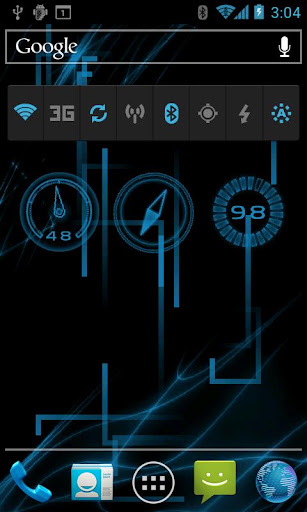
Power Controls v1.0 Apk | 46 KB | Mediafire
Requires Android:2.3.7 and up
An advanced power control widget.Allows one click wifi, mobile data, bluetooth, sync, and wifi hotspot toggle, two click gps toggle.
Has four brightness modes (low, mid, high, and auto). Also contains flashlight widget.
To use the widget, long press on the homescreen, and select widgets and the select the Power Controls widget.
Download -
Labels: Android 2.3.7 and Up, Android Apps, Android Widget
Folder Organizer v3.4.5.1 full Apk

Folder Organizer v3.4.5.1 full Apk | 1.9 MB | Mediafire
Requires Android:1.6 and up
Group items according to labels and create fully customizable folders and widgets. You can organize apps, bookmarks, contacts and shortcuts
v3.4.5.1 update:
- Improved icon pack support
- Restored small icons on tablet widgets
+ Change folder icon, icon pack support
+ Sort folder items any way you like
+ Make app shortcuts with custom icons and names
+ IconFinder support: search for new icons on the web
+ Put items in notification bar
+ Scrollable widgets
Tutorials are available in official site www.folderorganizer.net
Permissions are needed to read contacts and bookmarks, create direct call shortcuts and download new icons.
Folder Organizer can't be moved to sd card because it contains widgets (see Android documentation for details).
Please restart your home replacement or your device if you see wrong icons on home after a version update
Download Or Download
Download - Market
Labels: Android 1.6 and up, Android Apps, Android Widget
SiMi Folder Pro (Donate) v2.3 Apk
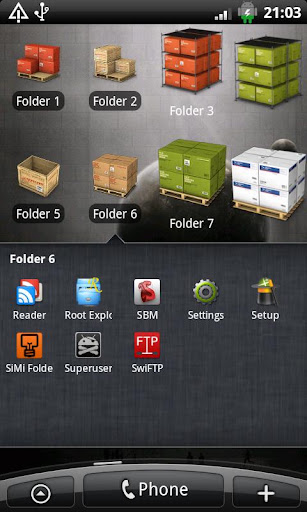
SiMi Folder Pro (Donate) v2.3 Apk | 604 KB | Mediafire
Requires Android:2.1 and up
SiMi Folder Pro is a customizable Folder Widget with a horizontal / vertical scrollable Launcher. (based on the Launcher from SiMi Clock)
v2.3 update:
- Folders will now be shown correct in ICS
Features
* Size 1x1, 1x2, 1x3, 2x1, 2x2 and 3x1
* 9 different Widget Layouts
* User defined Folder Icons
* User defined Text Color and Size
* Unlimited number of Apps can be linked to a Folder
* Unlimited number of Contacts can be linked to a Folder
* Unlimited number of Bookmarks can be linked to a Folder
* Unlimited number of Shortcuts can be linked to a Folder
* Unlimited number of Folders can be linked to a Folder
Download Or Download
Download - Market
Labels: Android 2.1 and up, Android Apps, Android Widget
Pure Calendar widget (agenda) v2.8.4 Apk
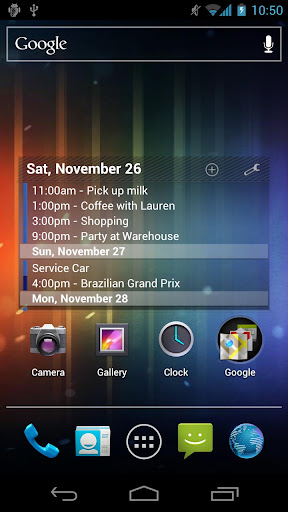
Pure Calendar widget (agenda) v2.8.4 Apk | 1.1 MB | Mediafire | FS | MS
Requires Android:1.5 and up
THE Android widget for agenda and tasks !!! Widget for Agenda / Tasks / TODO (agenda style)
v2.8.4 update:
# NEW enable horizontal resize capability (you NEED to enable the scrollable mode to fill the widget)
# NEW enable Holo theme in config panel for Honeycomb/ICS
# FIX text cut when using 'force line break'
# FIX brackets usage '<>'
- Synced with Google calendars
- Show calendars from Google, TouchDown & Moto/LG Exchange
- Show tasks from Astrid, CalenGoo, DGT Gtd, gTasks, Got To Do, Task Organizer, Due Today, TouchDown, Pocket Informant
- Can add bi-weekly / bi-monthly events (or more complex)
- Multiples skins and widgets sizes to make a fancy widget
- Scrollable widget with most alternative launchers like ADW, LiveHome, Go Launcher Ex, LauncherPro and now with native Android 3.0 (like Xoom tablet)
+++ scrollable widget, calendar widget, agenda widget, task widget, widgets +++
Download Or Download Or Download Or Download
Download - Market
Labels: Android 1.5 and up, Android Apps, Android Widget
Battery Monitor Widget Pro v2.0.5 Apk
Battery Monitor Widget Pro v2.0.5 Apk | 889 KB | Mediafire | HowFile
Requires Android:1.5 and up
The most complete tool to manage your battery: Shows historical data (%, mA, mW, mV and temperature), calculates estimated run-times and battery aging, helps calibrate battery and improve your battery run-time.
v2.0.5 update :
- Add missing ICS/glass when using English (sorry)
NB:
- NOT all phones report accurate mA - Check app web-site for more information
- The app displays the % remaining, voltage and temperature data reported by Android
Measures real battery capacity using historical data!
Display all information using great looking graphics, fully scrollable and zoomable.
Use additional packages to show great looking icons in notification bar
Display historical graphics or battery data on your home screen using widgets of various sizes!
Triggers alarm based on battery data (voltage and temperature limits)
Manually resets battery calibration/statistics on rooted phone
Support Motorola Defy/Atrix 1% reporting
Online help accessible from settings
Export data to System Tuner Pro to analyze which process is responsible for battery drain!
Lowest battery consumption on the market! Disable history/graphics for even lower consumption! Check web-site for app consumption and supported phones.
Download Or Download
Download - Market
Labels: Android 1.5 and up, Android Apps, Android Widget, Tools
App Folder Pro v1.22 Apk
App Folder Pro v1.22 Apk | 345 KB | Mediafire | Howfile
Requires Android:2.1 and up
Android Can Group Icons Now ! No Ads .! Make unlimited Folder !!! Simplest and Easiest way to group icons on your home screen.No more messy multiple pages of home screen with bunch of icons. You can just group them all now !
V1.22 update:
- extended the folder size (each folder can contain up to 20 apps)
You can name your folder (shown on home screen).
The folder will display the icons of its contents from the home screen.
Download Or Download
Download - Market
Labels: Android 2.1 and up, Android Apps, Android Widget
Battery Monitor Widget Pro v2.0.4 Apk
Battery Monitor Widget Pro v2.0.4 Apk | 889 KB | Mediafire | HowFile
Requires Android:1.5 and up
The most complete tool to manage your battery: Shows historical data (%, mA, mW, mV and temperature), calculates estimated run-times and battery aging, helps calibrate battery and improve your battery run-time.
v2.0.4 update :
- New ICS and transparent glass widget themes
- Estimated mA phones: improve mAh estimates and use charger mA
- New Russian translation
NB:
- NOT all phones report accurate mA - Check app web-site for more information
- The app displays the % remaining, voltage and temperature data reported by Android
Measures real battery capacity using historical data!
Display all information using great looking graphics, fully scrollable and zoomable.
Use additional packages to show great looking icons in notification bar
Display historical graphics or battery data on your home screen using widgets of various sizes!
Triggers alarm based on battery data (voltage and temperature limits)
Manually resets battery calibration/statistics on rooted phone
Support Motorola Defy/Atrix 1% reporting
Online help accessible from settings
Export data to System Tuner Pro to analyze which process is responsible for battery drain!
Lowest battery consumption on the market! Disable history/graphics for even lower consumption! Check web-site for app consumption and supported phones.
Download Or Download
Download - Market
Labels: Android 1.5 and up, Android Apps, Android Widget
Battery Indicator Pro v5.1.0 Apk
Battery Indicator Pro v5.1.0 Apk | 945 KB | Mediafire | Multiupload
Requires Android:1.5 and up
Battery Indicator Pro showz your battery charge level (percent) as an icon in your statuz bar, with temperature, health, voltage, and time since plugged / unplugged in the notification area. Now has an alarm feature.
v 5.1.0 update :
• Updated Slovak translation.
• Improved appearance on Droid X (and possiblity other, similar devices).
• Long-awaited experimental single-percent increments for some (many? most?) devices that previously only showed ten-percent increments. Please see the wiki on the project page for more info, and to report your results.
Features:
• Fully configurable green, amber, red, and black icons
• Icon plugins
• Estimated charge / discharge time left
• Battery logging. You can log the battery state (charge, status, voltage, temperature) and browse the logs on the phone or export to CSV.
• Manually or automatically disable / reenable device lock screen / lockscreen / keyguard
• Alarms (full, charge above X, charge below X, temperature above X, or health failure)
• Themes for main window
• Lots of configurability; most features are optional
• Very lightweight (please email me if you think otherwise, and I'll help you figure out what's wrong — I promise this app will not drain your battery.)
• Open source
Limitations:
• Many Motorola devices (particularly Droids) and the Samsung Moment only show every 10%
• It's not possible to replace the built-in battery icon
Download Or Download
Download - Market
Labels: Android 1.5 and up, Android Apps, Android Widget
Phantom Music Control v1.6.1 Apk + Pro key
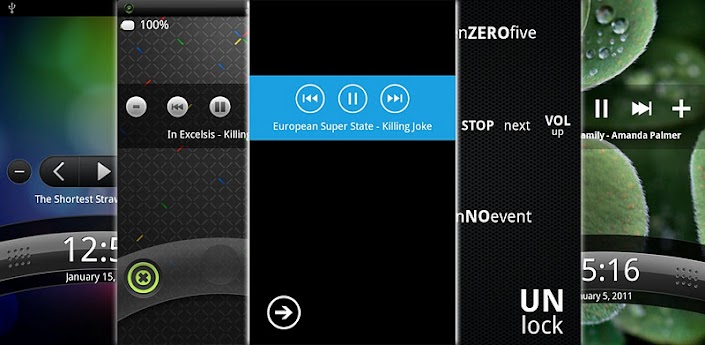
Phantom Music Control v1.6.1 Apk + Pro key | 363 KB | Mediafire | Multiupload
Requires Android:1.5 and up
Widely supported music control widget capable of hiding itself while there is no track playing. It is designed to be used with WidgetLocker Lockscreen, however it is possible to use it on your homescreen as well.
Supported players:
- Stock and modded Android Music (2.3+ with Pro)
- Google Music (Pro only)
- HTC Music
- MusicMOD
- PlayerPro
- PowerAMP
- UberMusic (Fede's Music App; Pro only)
- BeyondPod (Pro only)
- Experimentally Samsung TouchWiz (Pro only)
- Almost any other player (such as doubleTwist, Winamp, Meridian, ³/Cubed, MortPlayer, MIUI, Zimly, Songbird, Pocket Casts, etc.) in compatibility mode (Pro only)
Features:
- Auto-hide with various hide/reveal settings
- WidgetLocker events integration
- Possibility to show/remove some elements such as volume control and current track info
- Six graphical (H7C is just like Sense, Metro like WP7, Aero like Windows 7's Media Player) and one chromeless theme (minimalistic text inspired by Clockr and Calendr)
- Battery saving mode with almost zero energy consumption
- Localised to: English, Japanese, German, Dutch, Polish, Korean, French, Turkish, Czech, Spanish, Italian, Hungarian, Russian (some fully, some partially)
** If you have problems with Winamp support, open Winamp settings and check "Control Headset" option. It will work as charm. **
Download Or
Download
Download - Market
Labels: Android 1.5 and up, Android Apps, Android Widget
Beautiful Battery Disc v1.2.0 Apk ( AdFree )

Beautiful Battery Disc v1.2.0 Apk | 759 KB | Mediafire | Multiupload
Requires Android:2.1 and up
Beautifully designed, simple, customizable battery widget. Displays the remaining battery percentage in the form of a holographic disc or circle.
v1.2.0 update:
- Widget layout improvements
- New feature: change temperature scale on big widget
Beautiful Battery Disc has two sizes: 1x1 and 2x2.
Widget does not drain battery. It receives only battery broadcasts.
Circle battery widget fits perfect for Ice Cream Sandwich Devices with Holographic User Interface.
To add Battery Disc widget press: Home->Menu->Add->Widgets->Battery Disc
Press Battery Disc widget to display detailed information about your smartphone's battery.
Download
Labels: Android 2.1 and up, Android Widget
NotifierPro Plus v3.5 Apk
NotifierPro Plus v3.5 Apk | 166 KB | Mediafire
Requires Android:2.1 and up
NotifierPro displays your notifications with a modern style. Tired of having to leave your fullscreen app to check your messages ? With NotifierPro you can display your notifications in a modern style.
v3.5 update:
1. Fixed the "position" option
2. You can now make the banner stay longer with the timeout option
3. You can help translate the app in your language. Go to www.productigeeky.com for more details.
--== TO ACTIVATE THE SERVICE ==--
To work properly, NotifierPro requires that you activate the accessibility service « NotifierPro Service » (accessibility services are currently the only way to process notifications on Android systems)
- After installing, click « Open »
- Click « Activate service »
- If it’s not checked, check « Accessibility »
- Check « NotifierPro Service »
- Confirm
Your notifications will now be displayed.
--== HOW TO USE IT ==--
Once you have activated the service and configured the app, your notifications will show up on your screen :
- Click the notification to launch it
- Swipe to the right to dismiss it
- Swipe to the left to clear all upcoming notifications
Note that dismissing the notification won’t remove it from the status bar (Android system doesn’t allow to manually remove notifications from the status bar)
In the full version of NotifierPro, you can :
- You can choose the position of the notification
- You can choose the duration of the notification, and make it permanent
- You can choose to animate the notifications
- You have access to 6 exclusives themes
--== CONFIGURATION ==--
To receive toast notifications from an app, check it in the « Monitoring » section of the preferences.
Here are some examples of apps to check :
- Missed calls : Will show « Missed call from [caller] »
- Messaging apps (GO SMS, Handsent SMS, Trillian, Facebook Chat, Google Talk, …) : Will show a toast with the ID of the sender and the content of the message
- GMail
- K-9 Mail : Will show the ID of the sender and the subject of the mail
- Status bar : Will show toasts such as « USB connected », « Battery low » or « Battery fully charged »
- Market : Will show toasts such as « New updates available » or « Download finished »
- Calendar
- Dropbox
Download
Download - Market
Labels: Android 2.1 and up, Android Apps, Android Widget
Power Control Widget Plus v2.6 Apk ( ICS Support )

Power Control Widget Plus v2.6 Apk | 862 KB | Mediafire / Multiupload
Requires Android:2.1 and up
Power Control Plus is a widget that lets you turn on / off almost any setting on your phone, right from your home screen. Every aspect of Power Control Plus widgets are customizable, including color, size, behavior and more.
v2.6 update:
- Power Control Plus 2.6 brings Ice Cream Sandwich (4.0) compatibility fixes and general bug fixes.
Changes:
- Updated widget add directions for Ice Cream Sandwich
- Fixed bug on Galaxy Nexus where dropdown box on widget create screen became corruped when scrolling
- Blacklisted Samsung Fascinate due to brightness issues. App cannot be used on Samsung Fascinate.
Features:
- 100% compatible with Android 3.0 (Honeycomb) devices!
- 7 different widget sizes, including vertical widgets
- 9 different indicator light colors
- Over 30 settings available to toggle (list below)
- Power Control Plus doesn't run in the background, to save battery life
- Edit your widget right from the home screen
- Change background transparency
- Add labels to buttons on the widget
- Add a shortcut to any app on the widget
Download Or Download
Download - Market
Labels: Android 2.1 and up, Android Apps, Android Widget
Toggle It Full v1.1 Apk

Toggle It Full v1.1 Apk | 935 KB | Multiupload
Requires Android:2.1 and up
Toggle It makes it easy, fast to adjust, view your Android device's settings! Unlike the default Android Power control widget set that only allows for five toggle widgets, which cannot be changed, Toggle It lets you, the user, put as many different toggle widgets as you want on your device's home screens!
Current Toggle Widget Set:
Ringer - switch between normal, silent, and vibrate only for incoming phone calls
Phone Signal - turn off all telephony transmission signals, which can really save a lot of battery power
Mobile Data - enable to disable 2G/3G connectivity. This is especially handy if your Android device wireless device plan is not unlimited.
WiFI - enables or disables the WiFi connection on the device.
WiFi Tethering - enables or disables WiFi Tethering feature on the Android device. (Android 2.2+)
Bluetooth - enables or disables Bluetooth feature. (e.g. Bluetooth headset use)
GPS - enables or disables the GPS feature (e.g Google Maps use)
Airplane Mode - enables or disables all signal, transmissions to and from the Android device. Often used when flying, thus the toggle name.
Sync - enables or disables the Sync All feature. (e.g. if enabled will periodically sync all of the Google accounts associated with the Android device).
Auto-Rotate Screen - enables or disables the ability to rotate the screen via the related scensor. (e.g. whether the browser rotates into landscape mode from portrait and reverse, or just locks into portrait mode)
User Set Brightness - this toggle widget allows the user, with a swipe of their figner, to adjust the screen brigthness.
Screen Time Out - allows the user to change the time that elapses before the screen turns off. The values that can be set are 15 seconds, 30 seconds, 1 minute, 2 minutes, 10 minutes, or 30 minutes.
Screen Always On - when enabled the Android device's screen will stay on until the user pushes the power button. When this toggle widget is enabled, the Screen Time Out will be disabled.
Screen Brightness - this toggle widget allows the user to quickly switch from four different screen brightness values. Which include, minimal (lowest brightness), Auto (the actual lighting in the area of the device will dictate the brightness, thanks to the device's built-in sensor for such), User Set (this is the value that can be set with the User Set Brightness toggle), and finally Max, for maximum screen brightness.
Flashlight - will turn on or off the Flash or LED that is on the back of many Android devices, and set the brightness to its highest level.
SD Card (External Storage) - when pressed on this toggle widget will scan the device to a degree for files (e.g. media, music, etc.). It also will popup a message stating the amount of SD card (External Storage) available, and the overall size of the storage.
Haptic Feedback - when enabled will turn on the slight vibration feeling the user feels when pressing on certain User Interface areas, such as the "soft keys" (the hardware keys, e.g. Home, Back, Menu, and Search) on the Android device.
Battery - shows the current battery level (updates on 1% changes) on the toggle. Once clicked it shows the current status of the battery. Clicking on the popup dialog's Usage or History buttons will give even more in-depth information about what has been using the battery, back to when the first devices turned on.
Volume - this toggle widget will allow the user to adjust five different device volumes (Ringtone, Media, Alarm, Notification, and System).
Download
Download - Market
Labels: Android 2.1 and up, Android Apps, Android Widget
NotifierPro v3.3 Full Apk
NotifierPro v3.3 Full Apk | 166 KB | Mediafire / Multiupload
Requires Android:2.1 and up
NotifierPro displays your notifications with a modern style. Tired of having to leave your fullscreen app to check your messages ? With NotifierPro you can display your notifications in a modern style.
v3.3 update:
1. Better support for high resolution devices
2. You can now choose vibration patterns (pro)
3. You can now activate the notification sound
4. You now have 2 actions for swiping on the left
5. New quiet hours option
6. New reminder option
7. You can help translate the app in your language. Go to www.productigeeky.com for more details.
--== TO ACTIVATE THE SERVICE ==--
To work properly, NotifierPro requires that you activate the accessibility service « NotifierPro Service » (accessibility services are currently the only way to process notifications on Android systems)
- After installing, click « Open »
- Click « Activate service »
- If it’s not checked, check « Accessibility »
- Check « NotifierPro Service »
- Confirm
Your notifications will now be displayed.
--== HOW TO USE IT ==--
Once you have activated the service and configured the app, your notifications will show up on your screen :
- Click the notification to launch it
- Swipe to the right to dismiss it
- Swipe to the left to clear all upcoming notifications
Note that dismissing the notification won’t remove it from the status bar (Android system doesn’t allow to manually remove notifications from the status bar)
In the full version of NotifierPro, you can :
- You can choose the position of the notification
- You can choose the duration of the notification, and make it permanent
- You can choose to animate the notifications
- You have access to 6 exclusives themes
--== CONFIGURATION ==--
To receive toast notifications from an app, check it in the « Monitoring » section of the preferences.
Here are some examples of apps to check :
- Missed calls : Will show « Missed call from [caller] »
- Messaging apps (GO SMS, Handsent SMS, Trillian, Facebook Chat, Google Talk, …) : Will show a toast with the ID of the sender and the content of the message
- GMail
- K-9 Mail : Will show the ID of the sender and the subject of the mail
- Status bar : Will show toasts such as « USB connected », « Battery low » or « Battery fully charged »
- Market : Will show toasts such as « New updates available » or « Download finished »
- Calendar
- Dropbox
Download Or Download
Download - Market
Labels: Android 2.1 and up, Android Apps, Android Widget
iPhone Notifications Full v2.7 Apk

iPhone Notifications Full v2.7 Apk | 214 KB | Multiupload
Requires Android:2.1 and up
iPhone Notifications shows your Android device's notifications with IOS5 fashion. With iPhone Notifications you can greatly improve the way your Android device displays notifications. You can display your notifications with exactly the same fashion as on IOS5.
v2.7 update:
1. You can now make the phone wake up when you receive a banner notification
2. New Reminder option (pro)
3. You can now choose the width for the banners (for tablets and high resolution devices)
4. Bugs fixes
5. You can help translate the app in your language. Go to www.productigeeky.com for more details.
- After installing, click « Open »
- Click « Activate the service »
- If it’s not already checked, check « Accessibility »
- Check « iPhone Notifications Service »
- Confirm
--== HOW TO USE IT ==--
Once you have activated the service and configured the app, you can choose to display each app's notifications as alerts or banners.
Banners :
- Click the notification to launch it
- Swipe to the right to dismiss it
- Swipe to the left to clear all upcoming notifications
Alerts :
- Click "View" to launch it
- Click "Close" to dismiss it
Note that dismissing the notification won’t remove it from the status bar (Android system doesn’t allow to manually remove notifications from the status bar)
If you use a custom lockscreen app such as MagicLocker or WidgetLocker, the banners will show above your lockscreen.
--== LITE VS PRO ==--
With the full version of iPhone Notifications :
- You can display the full notification text
- You can choose the banners timeout, and make them permanent
- You can choose to make the alerts appear only when the screen is off
- You can choose the screen timeout when an alert shows up, and make it stay on until you read it
- You can lower the brightness of the screen when the alert makes the phone wake up
--== CONFIGURATION ==--
To receive notifications from an app, check it in the « Monitoring » section of the preferences.
Here are some examples of apps to check :
- Missed calls : Will show « Missed call from [caller] »
- Messaging apps (GO SMS, Handsent SMS, Trillian, Facebook Chat, Google Talk, …) : Will show a popup with the ID of the sender and the content of the message
- GMail
- K-9 Mail : Will show the ID of the sender and the subject of the mail
- Status bar : Will show popups such as « USB connected », « Battery low » or « Battery fully charged »
- Dropbox
Apps used on the screenshots :
- Espier Launcher
- MagicLocker with iPhone Lockscreen theme
Download
Download - Market
Labels: Android 2.1 and up, Android Apps, Android Widget
Folder Organizer Full v3.4.4.11 Apk
Folder Organizer v3.4.4.11 full Apk | 1.9 MB | Mediafire / Multiupload
Requires Android:1.6 and up
Group items according to labels and create fully customizable folders and widgets. You can organize apps, bookmarks, contacts and shortcuts
v3.4.4.11 update:
- Bug fixing on Honeycomb and Ice Cream Sandwich
+ Change folder icon, icon pack support
+ Sort folder items any way you like
+ Make app shortcuts with custom icons and names
+ IconFinder support: search for new icons on the web
+ Put items in notification bar
+ Scrollable widgets
Tutorials are available in official site www.folderorganizer.net
Permissions are needed to read contacts and bookmarks, create direct call shortcuts and download new icons.
Folder Organizer can't be moved to sd card because it contains widgets (see Android documentation for details).
Please restart your home replacement or your device if you see wrong icons on home after a version update
Download Or Download
Download - Market
Labels: Android 1.6 and up, Android Apps, Android Widget
Animated Widget Contact Pro 1.5.2 Apk
Animated Widget Contact Pro 1.5.2 Apk | 438 KB | Multiupload
Requires Android:2.1 and up
Fast Dial Widget Enables the User To Make Calls and SMS with Video Effects Bundle of Contact, Contact Group, Apps Launcher Widgets.
v1.5.2 update:
+ New type of widgets - "Bookmarks launcher".
+ New possibility to display widget titles and shortcut labels with semitransparent background. New application settings parameter: "Display labels with background".
+ Fixed bug that leads to group contacts crash on some devices.
+ Backup/resore dialogs was made more informative.
+ Possibility to set custom file names for backups.
+ Possibility to change backup folder in Application Settings, see parameter "Folder to store backups".
Contact, Group Contact widgets shows photo of the contact(s), have quick (speed) dial, quick SMS, chat and email options.
App Launcer widget shows selected by you apps at one icon, so you can group your apps for example: Games, Office, etc.
PRO version have no limitations on widgets count.
Animated fast dial widget greatly facilitates such tasks as dialing frequent or favorite contacts, sending SMS, MMS or e-mailing. Call your contacts in 2 taps.
The user’s actions are accompanied by customizable video effects, which are perfectly realistic and strikingly beautiful.
Favorite apps launcher. You can add some frequently used apps to group widget and start those apps in 2 clicks. You can Save space on your home screen.
Group items according to labels and create fully customizable folders and widgets. You can organize your apps.
Competitors: Folder Organizer, Circlelauncher, Apps Organizer, Circle Launcher, Smart Shortcuts
Download
Download - Market
Labels: Android 2.1 and up, Android Apps, Android Widget